
MahaB82A
March 21, 2026
Question

Animation gets cut

  • March 21, 2026
  • 1 reply
  • 73 views

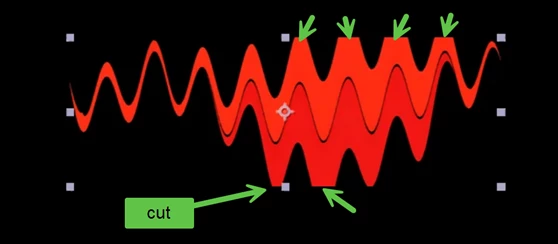
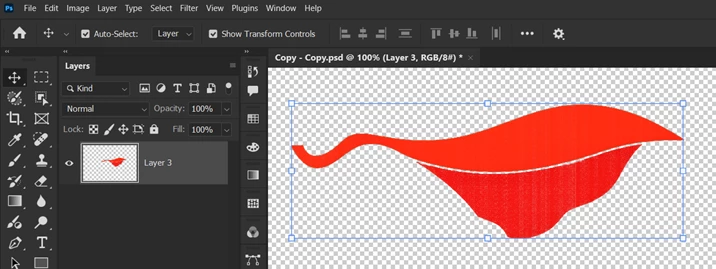
This is a PNG image animated [Wave Warp] in Ae and which was imported from Photoshop. You can see edges get cuts when animated. In my view this is because of bounding box in Photoshop. How to fix it? video is attached as well.


Ae image
 

In Photoshop image


    1 reply

    Warren Heaton
    Community Expert
    Community Expert
    March 21, 2026

    Hi, ​@MahaB82A 

    Wave Warp is an effect that does not render beyond the spatial resolution (that is, the width and the height) of the source footage.  As such, it clips.

    There are a few ways to address this.

    A quick one is to apply Grow Bounds.  You’ll find that under Effect > Utility > Grow Bounds.  After applying that, drag and drop it above Wave Warp in the Effect Controls panel or the Timeline panel so that it renders before Wave Warp.  It defaults to the Pixel value being 10, but you’ll want increase that to match or exceed the Wave Height value of the Wave Warp effect.

    Another approach is to pre-compose the source footage and then increase the width and height of the resulting Composition.  While the Layer is selected, choose Layer > Pre-compose… with “Leave all attributes” enabled and then click Okay.  With the resulting pre-comp in focus, choose Composition > Composition Settings, increase the Width and Height values, and then click OK.  Return to the containing Comp to view the results.  

    It looks like your source footage is a Layer in Photoshop with a larger document size (also called Canvas size) around it.  If that’s the case, you can replace the layer with itself with the import options set to “Document Size” instead of “Layer Size”.

    With any of these approaches, Wave Warp is still clipping, but in the transparent area around the artwork.


     - Warren