Sterphy
Known Participant
September 18, 2025
Question

Any way to hide this highlight?

  • September 18, 2025
  • 2 replies
  • 314 views

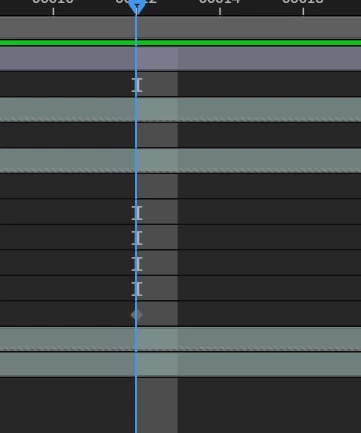
The grey section next to the cursor and those little ][ symbols - can we hide that? It just gets in the way for me and adds nothing



2 replies

Warren Heaton
Community Expert
Community Expert
September 27, 2025

While I wouldn't mind a preference to hide that, I would never want that highlight to go away.


Community Expert
September 18, 2025

That highlight is showing you shutter angle and shutter phase. It goes away if you just zoom out on the timeline a little way. The visual representation is an important clue that tells you how motion blur is going to work. You adjust those settings in the composition panel.

Sterphy
SterphyAuthor
Known Participant
September 26, 2025

But I don't need that information, and I like to see the alternating dark grey/light grey between the keyframes that you can only see when fully zoomed in. Any way to hide it without zooming out? I don't ever want to see it

Community Expert
September 26, 2025

It is a tool that you can't hide. If you enable motion blur, you see the Shutter Angle and Shutter Phase.  It's important to know where those values are when you are designing motion graphics that match the motion blur in video or film layers. 


In the latest builds of AE, turning off motion blur will display a fully highlighted frame when you move the "Timeline Navigator" start or end enough so you see approximately 15 frames in the Timeline panel.