


Apply faux text styles to multiple text fields
Is it possible to apply faux text styles from the Essential Graphics panel to multiple text fields? I'm trying to create a lower thirds mogrt where the text and styles are all linked but the position of the graphic, direction of the animation, etc changes with each one. Position would be picked from a dropdown menu in the mogrt. I've gotten the source texts linked to match, but the styles won't link. As you can see in the screenshot, all caps is chosen for the Title, and it works on the left side, but not the right.
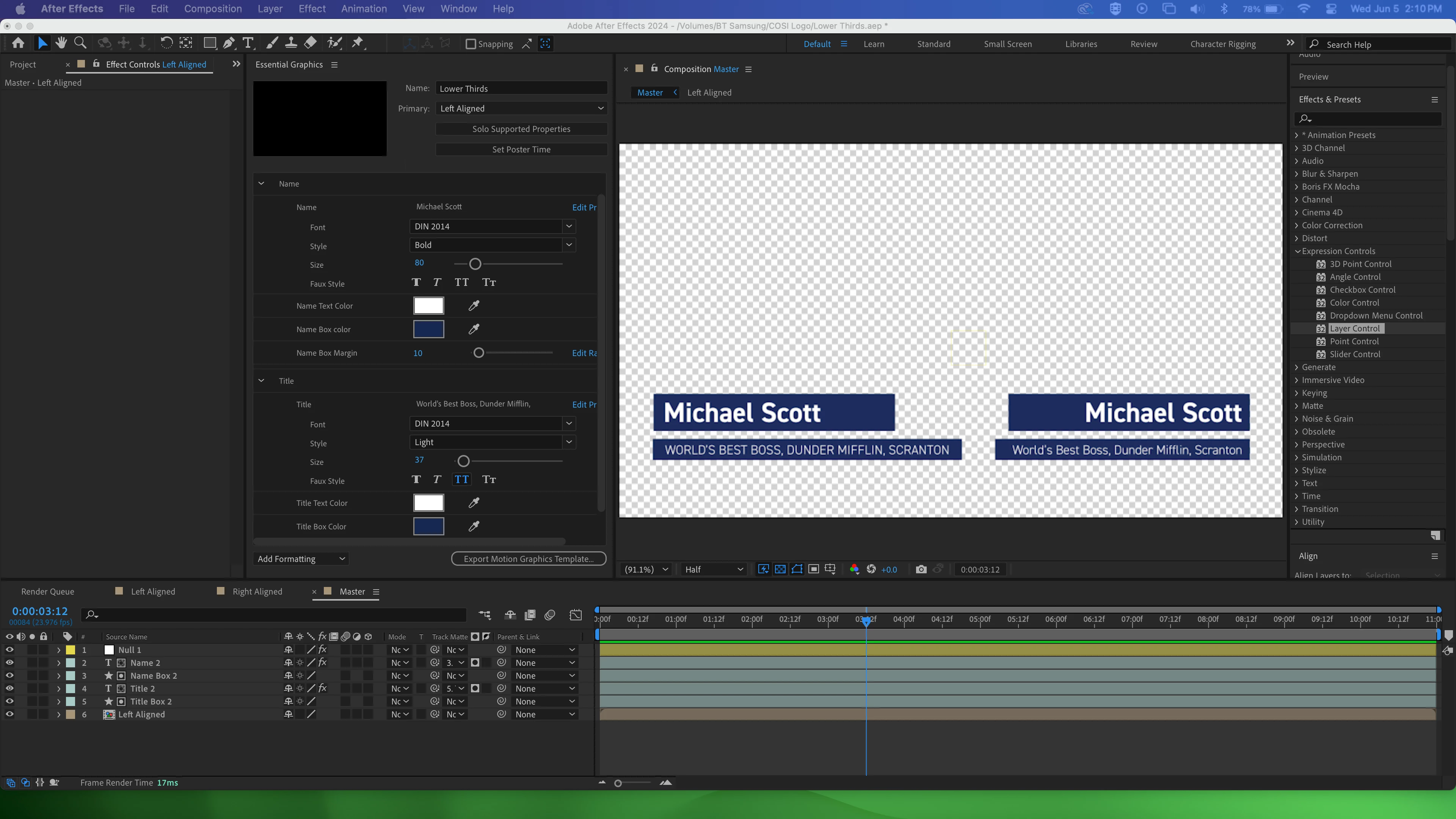
I currently have the source text and the different colors pick whipped to the Essential Properties in the Left Aligned comp so they are all linked. Because the text and faux styles are added within the Essential Graphics panel, I couldn't get those included. I was planning on pre-comping each position so the dropdown menu options would work. Is there an Expression Control preset for font that can be used more globally? Or a scripted reference I could put in the text expression to link the styles?
Also, this might not be the most efficient way to make a mogrt like this, but it made the most sense in my head! If there's an easier way to link text and styles and/or have different position options for a mogrt like this, please let me know 🙂 Thansk for any help on this!
 AdChoices