Participant
June 2, 2023
Question

Assigning Keyboard shortcut

  • June 2, 2023
  • 1 reply
  • 274 views

Hello everyone

I can assign them (see screenshot) 
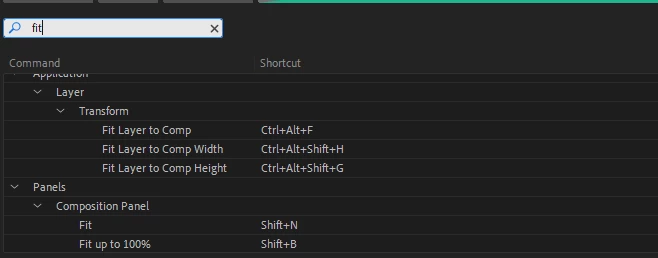
and they are written in the keyboard shortcut txt file (see attachment).

But they wont work. 

Ive reinstalled AE several times, tried to reassign the shortcuts multiple times. Ive written the shortcut by hand in the text file but it still didnt work. 

Any ideas how i can fix this?


Thanks for your sugestions

This topic has been closed for replies.

1 reply

Ishan Y
Inspiring
June 8, 2023

Hey m4nNi,

I'm sorry to hear you're experiencing this issue. The keyboard shortcut seems to be working on my end. Are none of the shortcuts mentioned in the screenshot working for you? For the Fit layer to comp shortcut, please ensure that the layer is selected and it's not already in the same scale as the comp.


Thanks,

Ishan

m4nNiAuthor
Participant
June 9, 2023

Thanks for your reply Ishan

In the meantime i figured out a Workaround.

I copied the .txt file from home to my workplace PC and this worked. But when i change any shortcuts it wont work.

It is as if my workplace AE has some issues with the .txt file it is writing.

Is it possible that it has something to do with windows language? The PC was originaly setup in German and i changed it to English. AE was installed in English from the beginning and the Keyboard is set to german (in windows and AE).

Thanks for your help

Greetings