


melbendi
Inspiring
October 17, 2026
Question

Audio is clipped in AE timeline but not in Audition

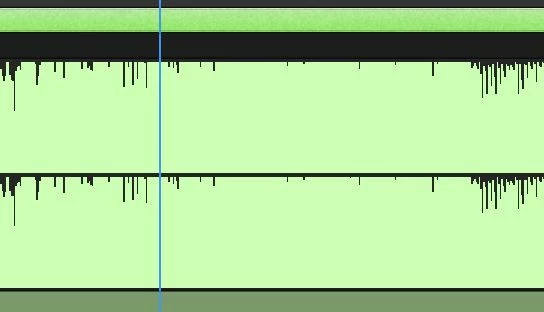
The music track is clipping on the timeline (not just the export) in AE, but I checked it in Audition and it isn’t clipped. It AE, the waveform looks like this:
 

and in Audition, after zooming out one click, it looks like this:
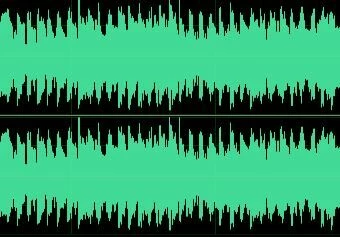
 

I tried exporting it from Audition as a WAV file, and it still comes into After Effect and Premiere as clipped. In AE, the levels are set at 0, so I tried reducing to -5 as a test, and the waveform is still flat on top. I updated my video card driver and it didn’t help. Does anyone have any suggestions? Thank you!

    2 replies

    melbendi
    melbendiAuthor
    Inspiring
    October 17, 2026

    I meant to post my specs: Win 11 Pro 25H2 (26200.9711), i9-14900K, 192 GB RAM, NVIDIA GeForce RTX 4080 SUPER.

    Translate
    Nishu Kushwaha
    Community Manager
    Community Manager
    October 19, 2026

    Hi, thanks for sharing your specs! Are you hearing distortion during playback and in the export, or is it just the waveform looking flat at the top?

    Could you share your exact AE version and a short sample of the WAV file so we can test it? Also, does it behave the same way in a new comp with only that audio layer?

    Let me know.


    Thanks,
    Nishu

    Translate