stefanf51186509
Known Participant
May 14, 2018
Question

Audio shifted ...

  • May 14, 2018
  • 3 replies
  • 2588 views

Hi there,

I've got an issue which has occured now in several different video  I set up. I hope there's a solution.

I record voice tracks in Audition and use them in After Effects. Somewhere between second 1 and second 2 there's a short audio shift, as if one of the stereo waves comes later for the length of one or two words than the other wave (you can hear the word twice).
But obviously it's not the stereo thing, I even tried it in mono:
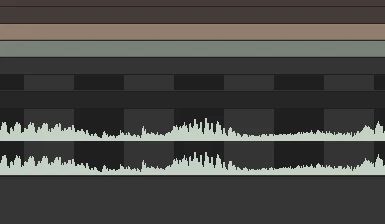
Still the problem is there. The wave in the middle is heard twice.

When I play the video in a loop, often in the second loop (though not always) the problem's gone, the sound is perfect. So is it maybe somehow only a (known?) issue of playing the video bei AE itself, and the video will be okay after rendering?
(I didn't render them yet, because I'm still in the stage of building some standard blocks for later videos.)

Or is there anything else I should do to get rid of that disturbance?

This topic has been closed for replies.

3 replies

Roland Kahlenberg
Legend
May 15, 2018

AE's Timeline always displays mono audio files as a stereo track, ie. you will see both a left and a right track.

On your issue, go to Preference>Previews to enable the option, Mute Audio When Preview is Not Real-time. Does this help?

Very Advanced After Effects Training | Adaptive & Responsive Toolkits | Intelligent Design Assets (IDAs) | MoGraph Design System DEV
stefanf51186509
Known Participant
May 15, 2018

Hi Roland, thank you!
I tried your suggestion and restarted AE after changing the settings. Unfortunately it doesn't solve the issue.

At least I am getting to know the several functions of AE better this way. :-)

Community Expert
May 15, 2018

The easiest way to know if you are having a real audio problem instead of a preview problem is to add your problem comp to the Adobe Media Encoder (Alt/Option + Ctrl/Cmnd + m) and choose h.264 encoding and one of the presets that match your frame size. YouTube 1080p HD would be a good one. If the render turns out just fine then you are having preview issues. Most newbies want AE to act like an NLE and playback their comps in real time with little or no waiting. AE has never done that, neither has any compositing app when you start pushing it. Don't expect real-time previews that run the length of your comp in the near future.      

stefanf51186509
Known Participant
May 14, 2018

Well? :-)
No idea?

Dave_LaRonde
Inspiring
May 14, 2018

Only one.  Check your project settings.  There may be a mismatch between sample rate and / or bit depth.

stefanf51186509
Known Participant
May 15, 2018

Thanks Dave, that was a very interesting hint, never had looked into those before. I set both Audition and After Effects to 32 bit depth now, increased the sample rate in Audition to 48,000 (can I do the same in AE?), but the problem remains.

Instead of

Hello my name is Stefan Finke and this is my video ...

I still get

Hello my name is Stefan FinFinkeke and this is my video ...

(In a better quality now, though.)

Hmmm.

stefanf51186509
Known Participant
May 14, 2018

PS Sorry I should have mentioned, that in Adobe Audition the playback is without a flaw.

Dave_LaRonde
Inspiring
May 14, 2018

I see a stereo audio track, and you probably don't need stereo.  Use Audition to make it mono.  Even more importantly, don't export compressed audio from Audition.  Make it a wav file.

stefanf51186509
Known Participant
May 14, 2018

Funny you say that, because that's exactly what I did. I saved it in a new file to show it to you.

Audition: Mono

Saved as an uncompressed .wav file. Mono.

Imported it to After Effects:

What do I miss? :-)