
Participant
July 16, 2020
Answered

Audio Spectrum effect on a half-circle path

  • July 16, 2020
  • 1 reply
  • 1967 views

Greetings folks! I have a bit of a question that I thought would be easy, but apparently is a bit trickier than I realised.


I'd like to render the wave-form of a song in a composition in AE. It's simple enough to add a complete circle path, add the Audio Spectrum effect, and then set it to use the circle. However, I'd like to position the circle half off-screen (Along the bottom), and have all of the audio spectrum visible on just the half that's visible.


I thought it would be as easy as deleting the points of the mask in order to make a non-closed path that fits the shape I want, however it seems that with the default settings, Audio Spectrum won't work on non-closed paths.


Has anyone managed to solve this with Audio Spectrum before? If not, is there maybe a more advanced third party plugin I could potentially look into?


Thanks so much!
This topic has been closed for replies.
Correct answer Rick Gerard

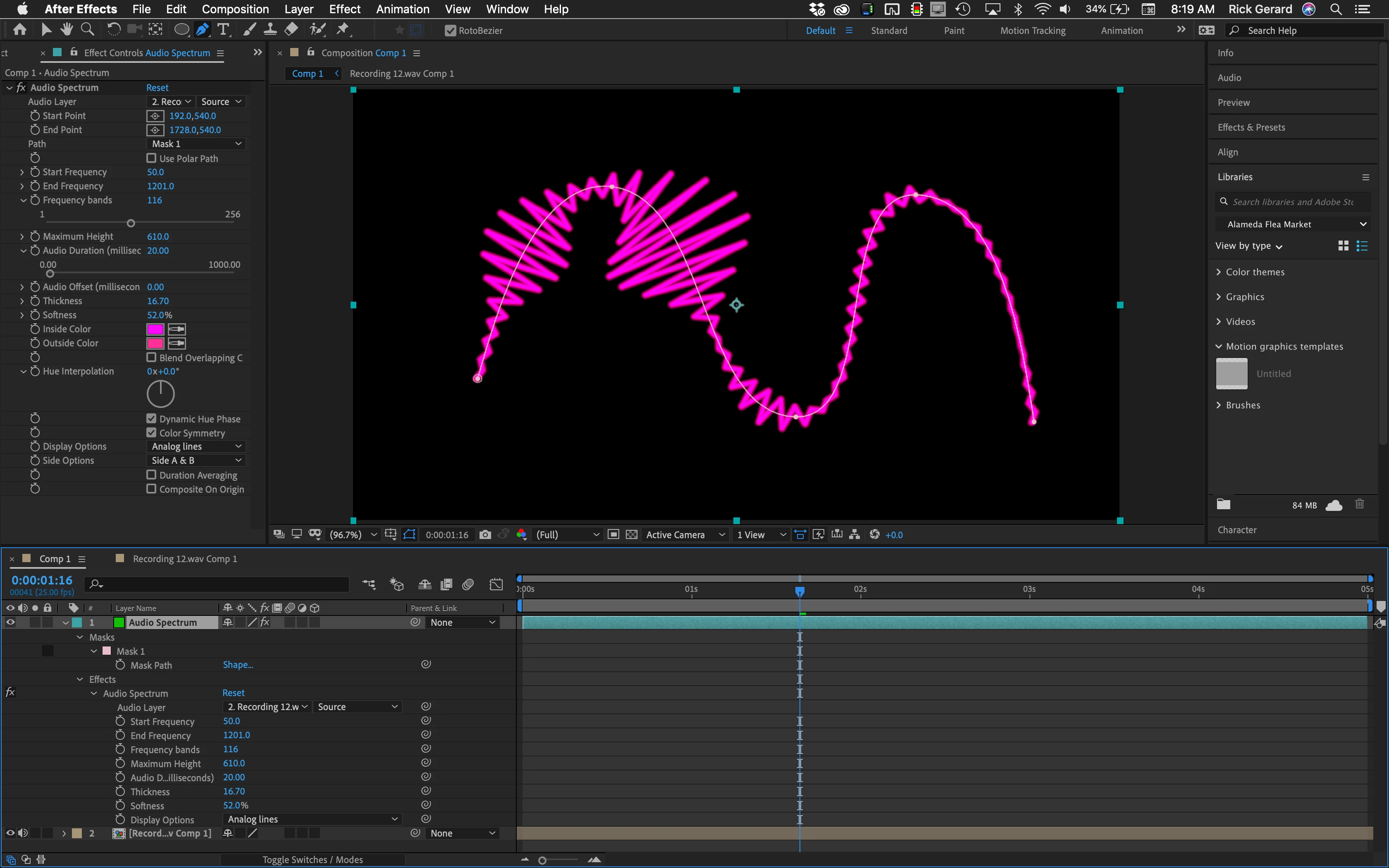
A closed path is not required. Any mask path can be used. Carefully check this screenshot. All modified properties of the effect are shown in the timeline.

1 reply

Rick GerardCommunity ExpertCorrect answer
Community Expert
July 17, 2020

A closed path is not required. Any mask path can be used. Carefully check this screenshot. All modified properties of the effect are shown in the timeline.

Participant
July 20, 2020

Hi Rick! Oh! You're right! I just tried copying what you did and it worked fine for me! Thanks for that!

That's so weird. So I guess the difference is if you create a non-closed path from scratch, it's fine. But somehow when I tried to "open" a closed path, I ended up breaking it somehow. I'll keep this in mind for next time.


Thanks so much for the quick answer!