
oskarigeo
Participating Frequently
September 19, 2017
Question

Auto-Orient to Camera creates unwanted Z orientation

  • September 19, 2017
  • 3 replies
  • 5889 views

I have eight icons arranged in a circle, a Null object in the centre, and a camera that's parented to the Null. Each icon is set to be a 3D layer, and Auto-Oriented towards the camera. The camera is Auto-Oriented to Point of Interest, and parented to the Null, so that I can adjust the Z rotation of the Null to have the camera orbit the circle (producing the effect that the circle of icons is carouselling around).

Everything else is perfect, but the icons on the sides are somehow inheriting quite a dramatic Z orientation / rotation. I've attached a screenshot below to illustrate what I mean.

How can I have each icon always face the camera, but remain fully level?
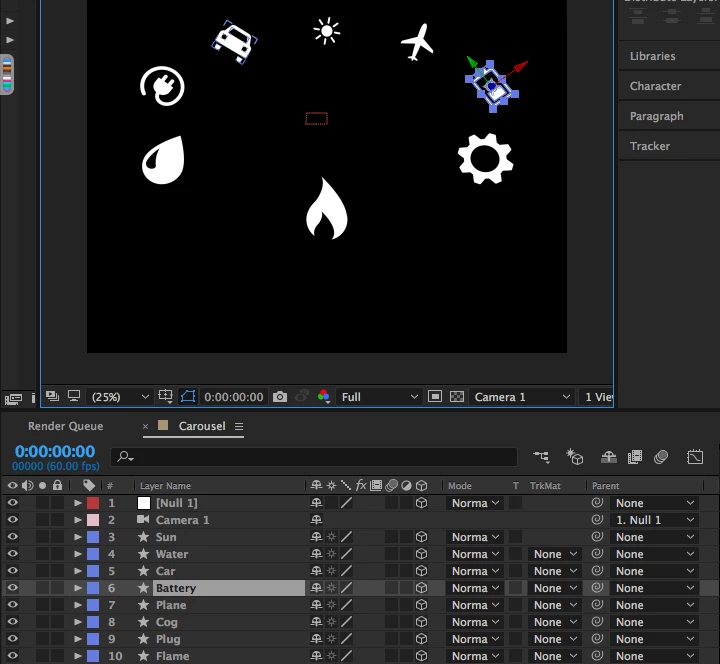
3 replies

angie_taylor
Legend
January 14, 2018

Can you expose the camera properties and the Null properties so we can see them in the screen shot please?. To do this, select them both and then double-tap the U key.

Participant
January 7, 2018

Instead of using auto orient to camera here is a workaround that always works for me.

  1. create a null at the anchor point of each icon. I will call these "Zero null"
  2. Link all Zero nulls to the "Main null" at the center. << this one drives the carousel rotation.
  3. in the Z rotation for all Zero nulls use this expression:   -thisComp.layer("Main Null").transform.zRotation
  4. Link each icon to it's own Zero null
  5. in the X rotation for all icons use this expression:    -thisComp.layer("Main Null").transform.xRotation
angie_taylor
Legend
September 19, 2017

The layers are orienting this way as the camera must be slightly off centre. However You can still tweak Auto-oriented values. Select all of the layers (except camera) open their rotation values by hitting the R key. Scribe the Z rotation value to compensate for the Auto-oriented rotation. All should change simultaneously.

oskarigeo
oskarigeoAuthor
Participating Frequently
September 19, 2017

The camera and Null object should be perfectly in the centre. The flame and sun icons (which are perfectly in the middle of the composition) have no rotation at all, and the rotation gets more extreme the further away from the centre they are.

I could compensate manually for it, but this means I'd have to do it for all icons each time the Null rotates, and that will get unmanageable very quickly. I was hoping for some setting or expression that would handle this automatically, no matter the orbit of the camera.

Szalam
Community Expert
Community Expert
September 19, 2017

See if this gives you a direction to follow: Dan Ebberts's Expressioneering Design Guide