Participant
May 15, 2018
Question

Auto Re-Sizing Text Boxes using sourceRectAtTime

  • May 15, 2018
  • 2 replies
  • 2199 views

Hello

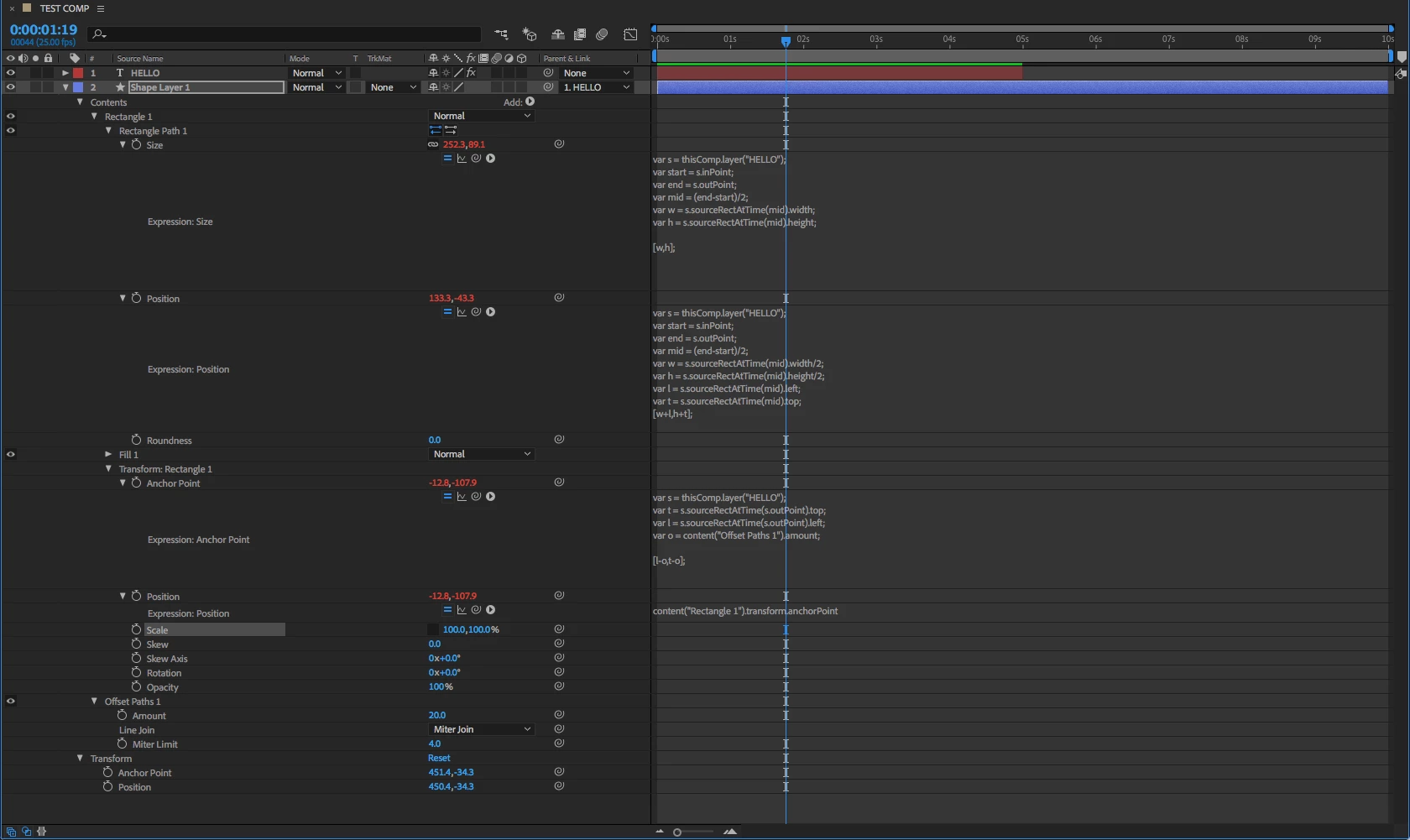
I've been using the sourceRectAtTime expression to create some auto-resizing text boxes for a template I'm creating.

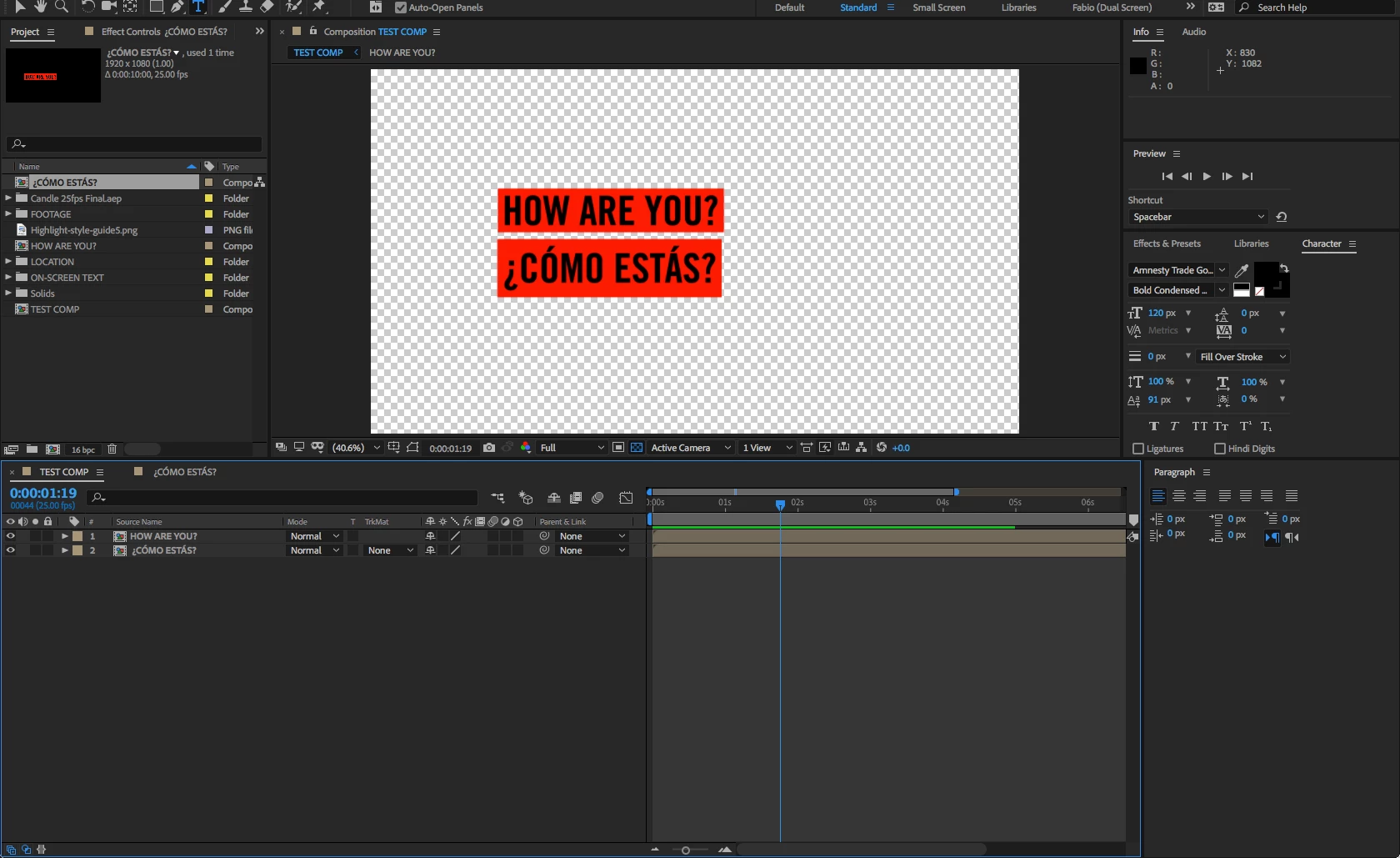
But i've run into difficulties when using accented letters (i.e. ¿CÓMO ESTÁS?) because it changes the heights of the box

I need t keep a fixed height regardless of whether I use accented letters or overhangs (J) or underhangs (y).

I also need the space/leading between each line of text to remain constant and not vary depending on what letters I enter.

Basically, how do I fix the height of the text boxes and only have the width variable? I've attached some screenshot to illustrate the problem.
This topic has been closed for replies.

2 replies

Community Expert
May 16, 2018

I created one couple of weeks ago

Note (expressions are universalized)

used this for POSITION :

content("Rectangle 1").content("Rectangle Path 1").size/2

t = thisComp.layer("Centered Text SC");

tRect = t.sourceRectAtTime(time,false);

tUL = t.toComp([tRect.left,tRect.top]);

tLR = t.toComp([tRect.left+tRect.width,tRect.top+tRect.height]);

tCenter = (tUL + tLR)/2

myRect = sourceRectAtTime(time,false);

myUL = toComp([myRect.left,myRect.top]);

myLR = toComp([myRect.left+myRect.width,myRect.top+myRect.height]);

myCenter = (myUL + myLR)/2

delta = myCenter - tCenter;

value - delta

and this for SIZE :

s = thisComp.layer("Centered Text SC");

thePadding = thisComp.layer("Controller").effect("Padding-Space")("ADBE Slider Control-0001");

x = s.sourceRectAtTime(time-s.inPoint,true).width +(thePadding*2)+thisComp.layer("Controller").effect("left-Right-Space")("ADBE Slider Control-0001") ;

y = s.sourceRectAtTime(time-s.inPoint,true).height +(thePadding*2)+thisComp.layer("Controller").effect("Top-Bottom--Space")("ADBE Slider Control-0001") ;

[x,y]

fabio81Author
Participant
May 16, 2018

Thanks .I will give this a try .

Does this work for accented letters then, like in my example above?

Community Expert
May 16, 2018

I guess for the accented letters there must be something like the Math.round

for decimal numbers, but I really don't know. Check Dan Ebberts

Mylenium
Legend
May 15, 2018

Nothing stops you from assigning a fixed value inside your expressions instead of your variables. Simply use e.g. [200,t-o] or whatever those values actually are.

Mylenium

fabio81Author
Participant
May 15, 2018

Thanks

But I don't think that solves the problem.

The height still varies depending on the type of letter I enter .Also, if I then want to scale the text the box won't scale with it.

Community Expert
May 15, 2018

sourceRectAtTime takes into account ascending and descending characters, font size differences and a bunch of other things. It also will read the size of a text box or text area that you draw. If you need the height of the box to stay the same just define the Y value in your expression.

If you want to make everything scale then you need to add a reference the scale value of the layer or the scale value of a text animator.