
Answered
Auto-Select Graph Type & Value Graph
I cannot see any change in the graph when selecting these two option. What is the different between these two options?
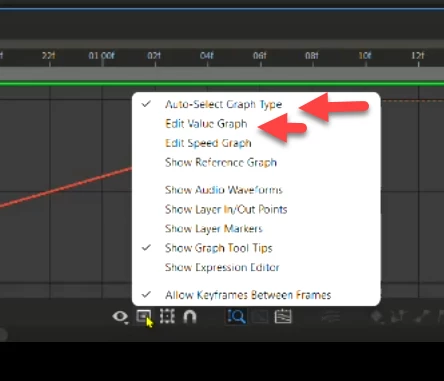

I cannot see any change in the graph when selecting these two option. What is the different between these two options?
Hi MahaB82A,
Thanks for writing in.
There are 2 types of graphs available in After Effects - Value Graph and Speed Graph. As the name suggests, the option Auto-Select Graph Type automatically selects the appropriate graph type for a property. The other option is to switch to the Value Graph manually.
Already have an account? Login
No account yet? Create an account
Enter your E-mail address. We'll send you an e-mail with instructions to reset your password.


 AdChoices