
April 9, 2022
Answered

Auto Trace problem

  • April 9, 2022
  • 1 reply
  • 1029 views

Hello,

I have encountered a problem with the auto trace feature inside After Effects.
I can't uncheck "Apply to new layer" as you can see on the screenshot below.
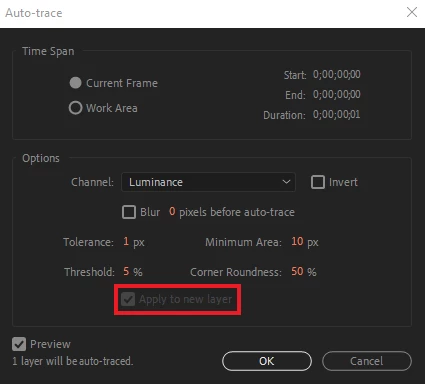


Would love to hear a solution for this since it's quite annoying.

Sincerely

M Daamen

This topic has been closed for replies.
Correct answer Andrew Yoole

What kind of layer are you tracing?  Can you show us a screengrab of the entire workspace, not just the autotrace window?  It looks like you might be trying to trace a Shape layer or Text layer.  

1 reply

Andrew Yoole
Andrew YooleCorrect answer
Inspiring
April 9, 2022

What kind of layer are you tracing?  Can you show us a screengrab of the entire workspace, not just the autotrace window?  It looks like you might be trying to trace a Shape layer or Text layer.  

April 10, 2022

I was trying to trace a text layer yea

@mj
Community Expert
Community Expert
April 10, 2022

Hi @22334150 ,


If you wish to have your text as shapes do the following:

  • Choose Layer menu and Create Shapes From Text.
  • or Right-click the text layer and choose Create Shapes From Text.


hth

mj