

m1jackson
Inspiring
November 9, 2022
Answered

Automation Blocks - Adding Expressions to Shape Size

  • November 9, 2022
  • 1 reply
  • 335 views

I'm trying to build a Shape Layer with some expressions and am coming across some difficulties.


I'm not able to add an expression to the size field of a Rectangle Shape.

 

Can't add the expression via a text block.
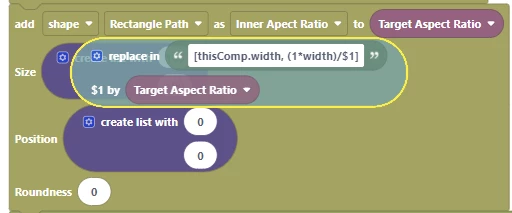
Nor would it accept the expression when formatted via a Create List Block
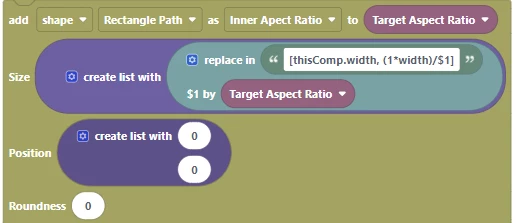
If figured that it might be because it was that it was just look for two numbers, so I when I broke it into values, everything worked fine, but the live "expression" [thisComp.width, (1*width)/2.39] is not settable.
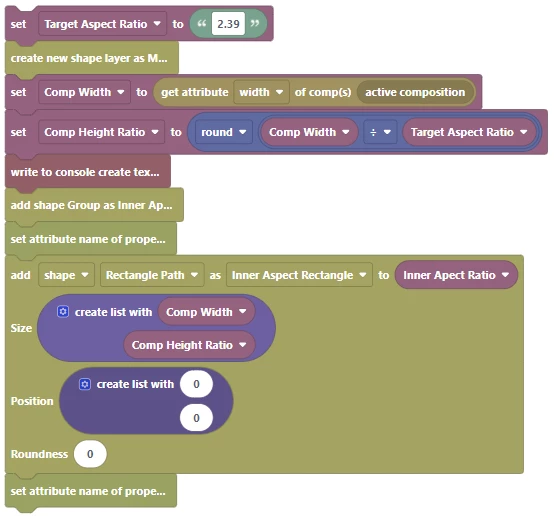
Is there any way to set this expression?

This topic has been closed for replies.
Correct answer Mathias Moehl

Hi,

the "Add Shape" block only allows to set a value, but not an expression. After creating the shape path, you need to use the "Set Attribute of Property" block to set the expression.

Alternatively, you can save the shapes and the expressions applied to them in an animation preset and then apply the preset like I do in this tutorial: https://mamoworld.com/docs/automation-blocks/tutorials-ae/programmingAHighlightTool


1 reply

Mathias Moehl
Community Expert
Mathias MoehlCommunity ExpertCorrect answer
Community Expert
November 10, 2022

Hi,

the "Add Shape" block only allows to set a value, but not an expression. After creating the shape path, you need to use the "Set Attribute of Property" block to set the expression.

Alternatively, you can save the shapes and the expressions applied to them in an animation preset and then apply the preset like I do in this tutorial: https://mamoworld.com/docs/automation-blocks/tutorials-ae/programmingAHighlightTool


Mathias Möhl - Developer of tools like BeatEdit and Automation Blocks for Premiere Pro and After Effects