

m1jackson
Inspiring
October 13, 2024
Answered

Automation Blocks - Check for effect

  • October 13, 2024
  • 1 reply
  • 320 views

I'm looking to see if a layer has an effect, and if not apply it.


How to do check if a layer in a comp has a specific effect applied i.e. "camera lens blur", and if it's not there, apply it with specific values?


Alternately, if the effect is applied, change the value to a desired value? (I think, I can figure this part out once the first part is answered, but this is where I'm headed)


As always, thanks for your input.
This topic has been closed for replies.
Correct answer Mathias Moehl

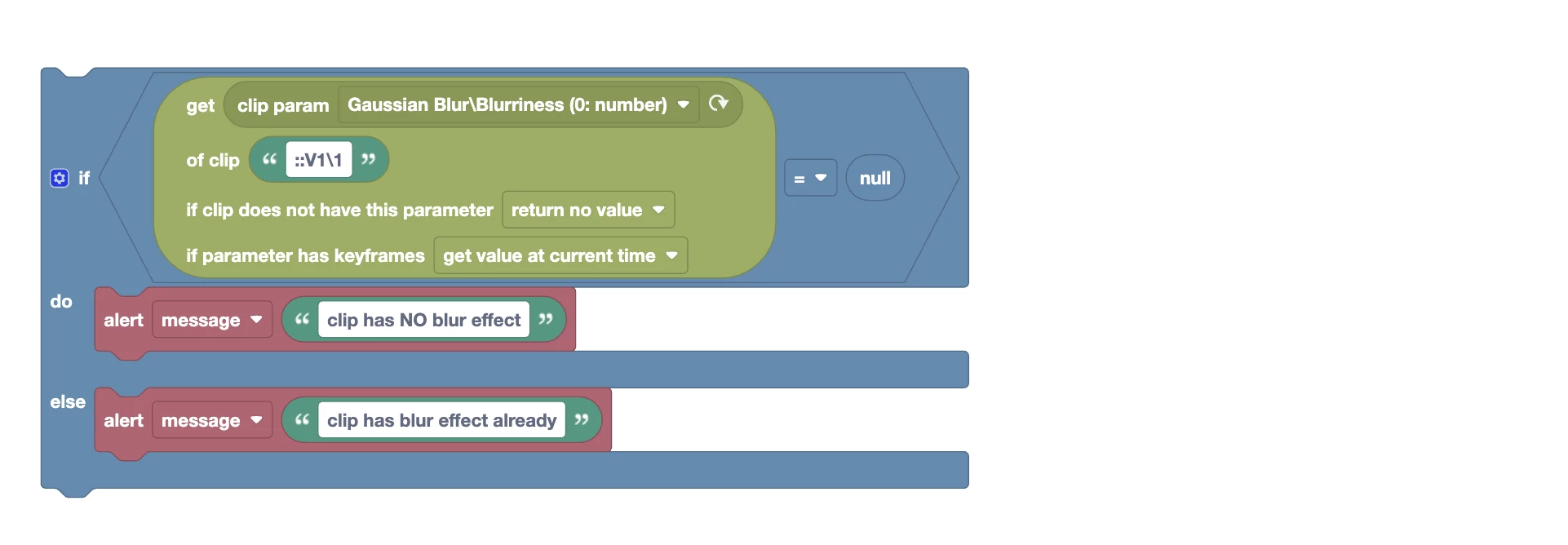
To check if a clip has a particular effect applied to it, you could try to get a param of that clip and check if the result is null (make sure to set the option to "return no value" if clip does not have this param).

Here is a quick test I did with testing if the first clip in V1 contains a Gaussian Blur:


1 reply

Mathias Moehl
Community Expert
Mathias MoehlCommunity ExpertCorrect answer
Community Expert
October 14, 2024

To check if a clip has a particular effect applied to it, you could try to get a param of that clip and check if the result is null (make sure to set the option to "return no value" if clip does not have this param).

Here is a quick test I did with testing if the first clip in V1 contains a Gaussian Blur:


Mathias Möhl - Developer of tools like BeatEdit and Automation Blocks for Premiere Pro and After Effects