

m1jackson
Inspiring
November 4, 2024
Question

Automation Blocks - Function with input name

  • November 4, 2024
  • 1 reply
  • 312 views

I'm trying to work on putting together more efficent blocks by using functions appropriately.


I've got 3 check box choices on a form that fill variables "choice Previs, choice Postvis, choice Finals"
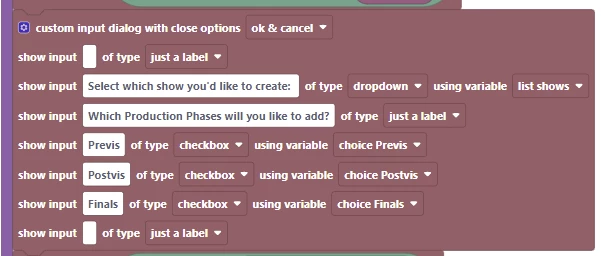
I know that I can do three if blocks to execute commands based on this, but can I use input names on a function to use the variables?
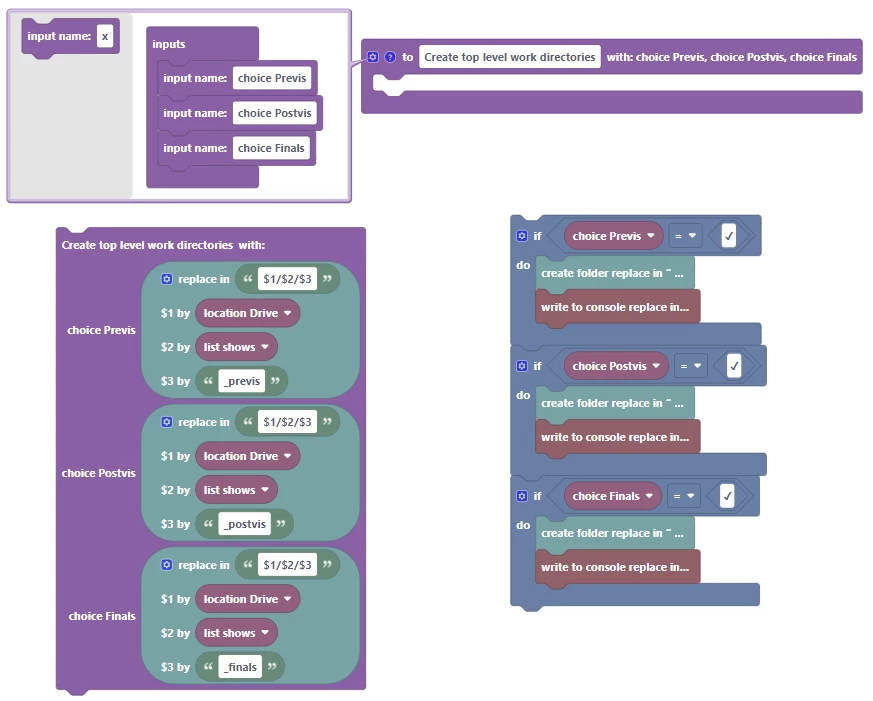
I'm figuring I have this fundimentally incorrect, but I "know" there is something in here that can do what I'm looking to do.


As always, your input is appreciated!


This topic has been closed for replies.

1 reply

Mathias Moehl
Community Expert
Community Expert
November 5, 2024

In Automation Blocks, functions are not first-class citizens. There is no way to save a function in a variable and then execute that variable. Your solution with the if statements is probably the best solution. 
The only workaround to actually save a function in a variable is defining the function in an Execute Code block, but that requires that you implement the entire function inside the Execute Code:


Mathias Möhl - Developer of tools like BeatEdit and Automation Blocks for Premiere Pro and After Effects