
Participating Frequently
November 11, 2024
Answered

Automation Blocks - Get property value that have an expression

  • November 11, 2024
  • 2 replies
  • 530 views

Hello!

I'm trying to get a value from the Position property that have an expression which is modifing the original value to a new one, but whenever I use the Get Attribute type "Value" block, it gets the raw value instead the new one with the expression.

I even tried using a custom script block with the ".valueAtTime(currentTime, true)" to get value with expression but still no good.

Is there a way to actually get the current value of the property?


Thank you!
This topic has been closed for replies.
Correct answer Mathias Moehl

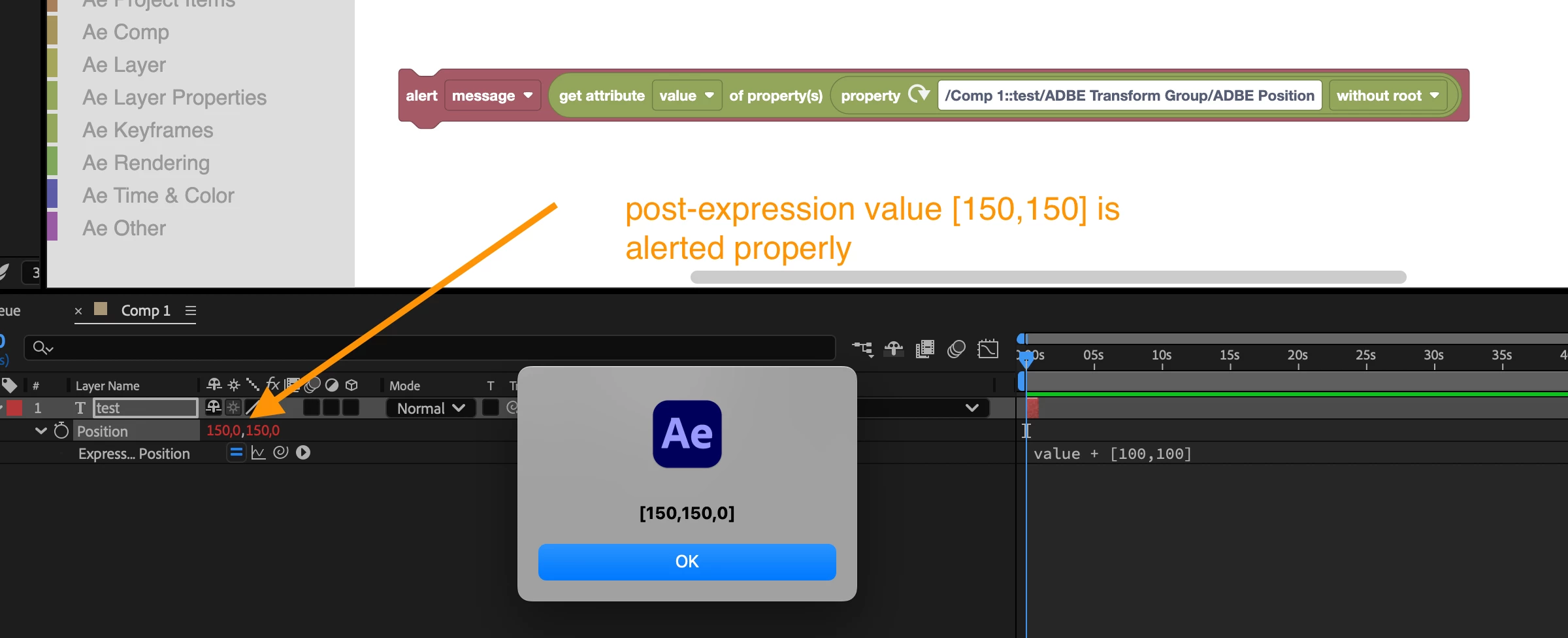
Actually, Automation Blocks returns the post expression value. I just did a quick check and on my machine it works as expected:

Here the pre-expression value is [50,50] and the expression adds 100 to both x and y.

Maybe you are accidentally retrieving the value of a wrong property or some other bug in your code?

2 replies

Mathias Moehl
Community Expert
Mathias MoehlCommunity ExpertCorrect answer
Community Expert
November 11, 2024

Actually, Automation Blocks returns the post expression value. I just did a quick check and on my machine it works as expected:

Here the pre-expression value is [50,50] and the expression adds 100 to both x and y.

Maybe you are accidentally retrieving the value of a wrong property or some other bug in your code?

Mathias Möhl - Developer of tools like BeatEdit and Automation Blocks for Premiere Pro and After Effects
Participating Frequently
November 11, 2024

yea! I just deleted everything and started from scratch, defenily it was something wrong with my code (as it's the case of 99% of the issues that happens haha)

thank you for the help!

Dan Ebberts
Community Expert
Community Expert
November 11, 2024

I think "true" gives you the pre-expression value. Try "false".

Participating Frequently
November 11, 2024

Yea, I tried both. Each returns a different value, but neither are correct.