

m1jackson
Inspiring
December 15, 2022
Question

Automation Blocks - Get Value and Expression It

  • December 15, 2022
  • 1 reply
  • 670 views

I've been doing so much file management stuff, I've not yet dived too far into layer stuff yet. So, I thought I'd start of simple, and very quickly got lost.

I find myself accidentally grabbing layers and moving them and have found that expressing them to a position works really well when working.


I am unable to figure out how to "get" a value of a selected layer and then express that value into the position field.

How do I turn this...

Into this?

 

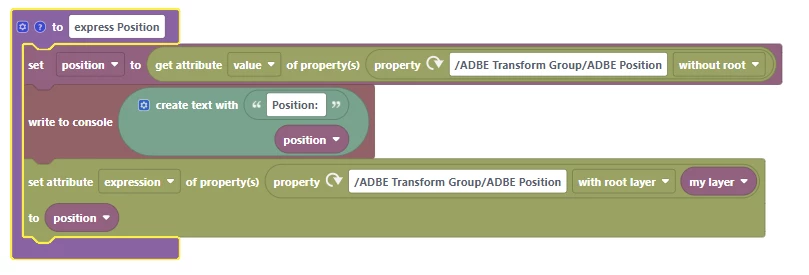
I know how to "set" the expression via a block, but not how to poll the Position value into a variable so I can apply it, but this ain't it.
 

As always, any input is appreciated.

This topic has been closed for replies.

1 reply

Mathias Moehl
Community Expert
Community Expert
December 15, 2022

I think the issue is the "without root" option of your "get attribute value" block.

You need to choose a root layer there from which the position should be taken.


I just did this quick test, which "expresses" all selected properties:

Technical detail: Note that "my value" is a list and when using it for setting the expression, it is converted into a text of the form "[val1,val2,val3]" automatically, which is the correct syntax you need in expressions.

Mathias Möhl - Developer of tools like BeatEdit and Automation Blocks for Premiere Pro and After Effects
m1jackson
m1jacksonAuthor
Inspiring
December 16, 2022

So I'm getting how this expresses ALL channels, but I'm only wanting to express the Position property (or a specified set of properties) of a selected layer(s) without having to roll out and select the property?

Mathias Moehl
Community Expert
Community Expert
December 16, 2022

Yes, then you can do it exactly the way you tried. Just make sure to use the "root layer" as I explained in my last post.

Mathias Möhl - Developer of tools like BeatEdit and Automation Blocks for Premiere Pro and After Effects