
Participant
Jan 18, 2024 2:30 PM UTC
Answered

Automation Blocks : Is there a way to force stop a script?

Hello,


I built a script that checks a variable. If the variable is OK, the script continues but if it's not, I would like to stop the script. Is it possible?


I noticed that some UI blocks could do it (open file dialog, save dialog, ...) but I'm looking for a simpler block (just the "stop script" function).
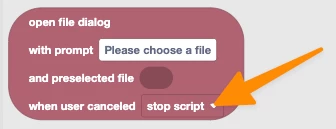
 

The only workaround I've found so far is to prompt an alert and intentionally provoke an error (but it's not the cleanest solution 😅)...
Mathias Moehl
Mathias MoehlCorrect answer
Community Expert
Jan 18, 2024 3:10 PM UTC

Hi Robin,

there is no "stop script execution" block, but instead you can

1) put your entire script code into a function block

2) return from that function whenever you want to stop script execution.


I just recorded this tutorial for you to explain it in full detail:


PS: If anybody reading this wonders what Automation Blocks is: It is a (paid) extension to create custom tools and automations for Adobe Premiere Pro and After Effects.


Mathias Möhl - Developer of tools like BeatEdit and Automation Blocks for Premiere Pro and After Effects

2 replies

Mathias Moehl
Community Expert
Mathias MoehlCommunity ExpertCorrect answer
Community Expert
Jan 18, 2024 3:10 PM UTC

Hi Robin,

there is no "stop script execution" block, but instead you can

1) put your entire script code into a function block

2) return from that function whenever you want to stop script execution.


I just recorded this tutorial for you to explain it in full detail:


PS: If anybody reading this wonders what Automation Blocks is: It is a (paid) extension to create custom tools and automations for Adobe Premiere Pro and After Effects.


Translate
Mathias Möhl - Developer of tools like BeatEdit and Automation Blocks for Premiere Pro and After Effects
Participant
Jan 18, 2024 4:16 PM UTC

Very interesting! Thank you so much for your help! 🙏


(I struggled a bit because I have a lot of functions and loops, but I finally managed to get it done!)

Translate