m1jackson
Inspiring
November 3, 2022
Answered

Automation Blocks - Run Script...

  • November 3, 2022
  • 1 reply
  • 2803 views

The tracking software I use (Syntheyes) exports out .jsx files and creates scenes inside AE. It's great! With Automation Blocks, I'd love to run the script and do a bunch of repetitive tasks after it's imported and clean up the scene.


Is there a way to launch a specific .jsx script from an animation block?
This topic has been closed for replies.
Correct answer m1jackson

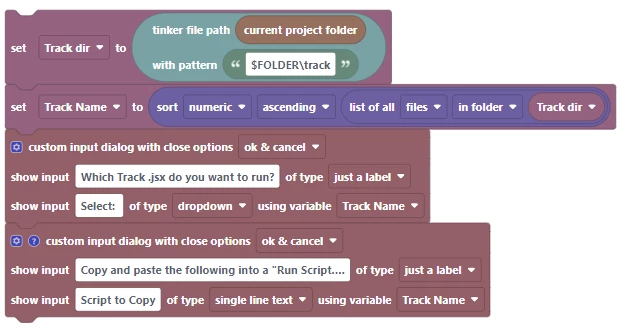
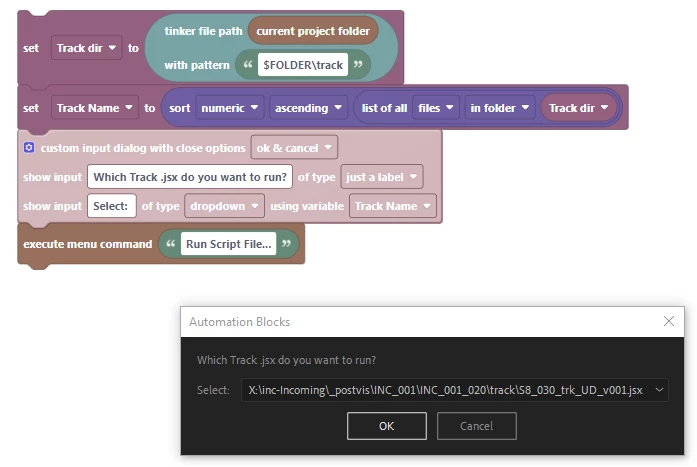
Do you get this when running the menu command from AB? Then I guess at the moment there is no workaround, unfortunately...


Drag, Ok. I do have a workaround for now. I'll very much be looking forward to the next version.

1 reply

Mathias Moehl
Community Expert
Community Expert
November 4, 2022

Hi Mike,
it is on my feature request list for future versions but not available, yet. The only thing you could do right now is to save a jsx in Ae's scripts folder, such that it shows up in the Ae menu File->Scripts (same as we do for keyboard shortcuts). Then you can use the block Execute Menu Command to execute that script.
Workflow could be
- always keep a script with name say "tempscript.jsx" in your scripts directory (it needs to be there already when you launch Ae such that it shows up in the Ae menu).
- when you need to execute a script overwrite the file tempscript.jsx by that script and execute the menu command "tempscript.jsx".

Mathias Möhl - Developer of tools like BeatEdit and Automation Blocks for Premiere Pro and After Effects
m1jackson
m1jacksonAuthor
Inspiring
November 4, 2022

I'll look into this for sure. I'll get thru this one too.


It's always something. <smirk>

m1jackson
m1jacksonAuthor
Inspiring
November 4, 2022

And in researching this online I came across this from 2 years ago when having an issue with kBar


https://community.adobe.com/t5/after-effects-discussions/kbar-can-t-quot-run-script-file-quot/td-p/10742126


Sooooo.