

m1jackson
Inspiring
December 17, 2024
Question

Automation Blocks - Set Attribute (source item)

  • December 17, 2024
  • 1 reply
  • 407 views

I'm creating a script that replaces footage with other footage and have encountered what I'm hoping is a "my problem" and not a bug.


I've a template project that has actual footage in it that is the used in varous places in the project.
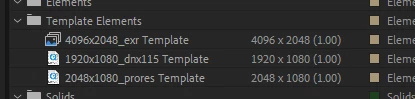
And this works sucessfully with the following blocks
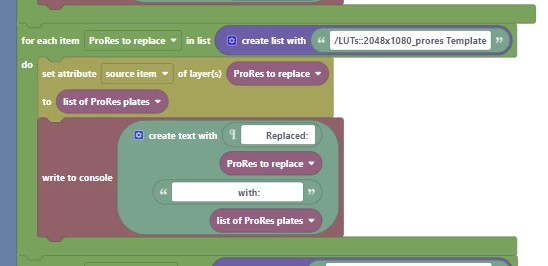
The 2048x1080 footage (source item) get replaced as expected.


However, when I tried to simplify things and reduce my template comp by using "Placeholders" or "Solids" in the project window of a different template file.
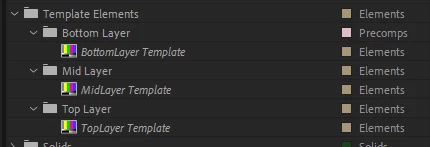
Using the following script block...
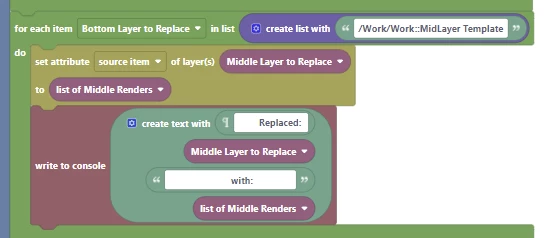
 

I get the following error message.

 

Am I stuck with using actual footage to make these templates work? I only ask cause I have to have template footage that can be somewhat large on occasion rather than using internal Solids or Placeholders.


Thanks as always.

This topic has been closed for replies.

1 reply

Mathias Moehl
Community Expert
Community Expert
December 17, 2024

You loop over "Bottom Layer to replace", but try to set the source of "Middle Layer to Replace". Is this really what you want?

Also, I am not sure why you work with lists here.

The "Set Attribute source item of layer(s)" block can either take a single layer and a single project item as arguments, or a list of layers and a list of project items. The latter case if for setting multiple layer sources in a single call. However, in that case, both lists must have the same length (like setting the project items of 10 layers needs 10 layers and 10 new project items). The error message "cannot convert this to a layer" suggests that you may have lists of different length or that the list contains entries which are no layers.

Mathias Möhl - Developer of tools like BeatEdit and Automation Blocks for Premiere Pro and After Effects
m1jackson
m1jacksonAuthor
Inspiring
December 17, 2024

I only do the 'loop' because I sometimes replace the footage in multiple comps thruout the project.

m1jackson
m1jacksonAuthor
Inspiring
December 17, 2024

...aaaand I figured out "my" problem. I wasn't replacing the right things with the correct things.


In my original post I was replacing Bottom Layers with Middle Layers.


Doh!