

m1jackson
Inspiring
November 8, 2022
Answered

Automation Blocks - String to Number, Version Up

  • November 8, 2022
  • 2 replies
  • 574 views

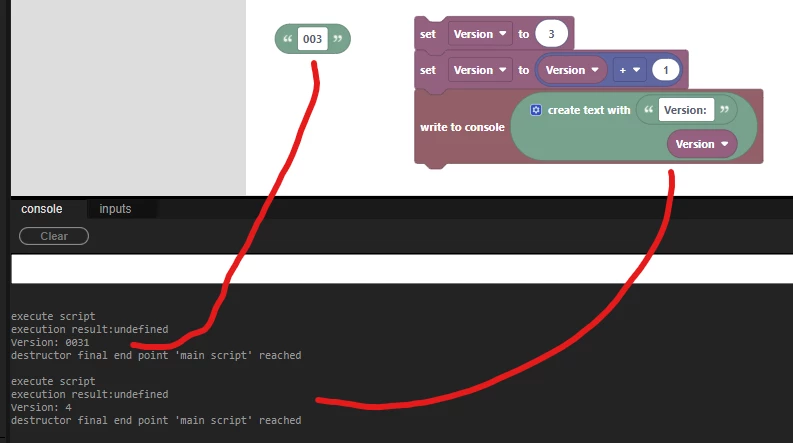
I get why in the following example when adding "003" + 1 = 0031 because it's a string concatinating with a number. So adding a number with a number gets the proper result of "4".
 

My question is two parts:

  1. How would I extract out the padded number "001" from a filename string to treat it as a number.
  2. Version up that number and pad it back to 3 numbers before adding it back into my file name?

INC_301_501_ptv_v001.aep

INC_301_501_ptv_v002.aep


I can't leave it as just v1, v2, v10 as clients make it a requirement for sorting purposes.
This topic has been closed for replies.
Correct answer Mathias Moehl

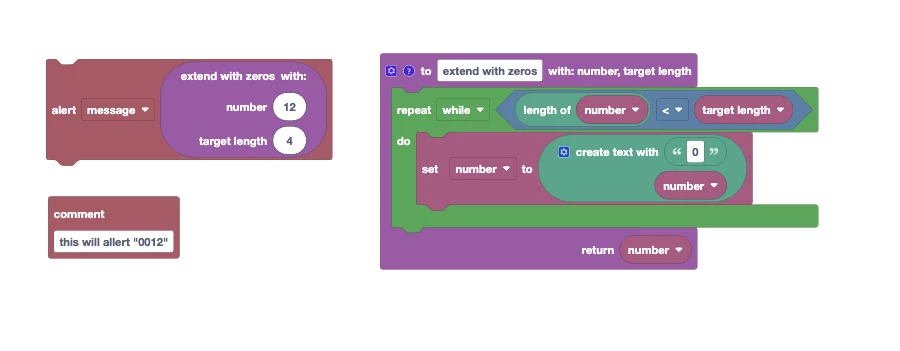
Here is the detailed answer to your second question (extending a number like "12" to 0012.

Attached you find a function which does exactly that. The example here will alert "0012"

Also note that this function works no matter if the argument "number" is a number or a text. But it won't trancate the numbers. So if you try to bring 99999 to a length of 3 it will return the 99999 unchanged.

2 replies

Mathias Moehl
Community Expert
Mathias MoehlCommunity ExpertCorrect answer
Community Expert
November 8, 2022

Here is the detailed answer to your second question (extending a number like "12" to 0012.

Attached you find a function which does exactly that. The example here will alert "0012"

Also note that this function works no matter if the argument "number" is a number or a text. But it won't trancate the numbers. So if you try to bring 99999 to a length of 3 it will return the 99999 unchanged.

Mathias Möhl - Developer of tools like BeatEdit and Automation Blocks for Premiere Pro and After Effects
m1jackson
m1jacksonAuthor
Inspiring
November 8, 2022

As always, your is a far superior solution. Just so you know, I really am trying to figure this stuff out and this is what I had come up with before you posted your second reply.


Mathias Moehl
Community Expert
Community Expert
November 8, 2022

For the first part of the question: the "round" block in the math category can for example be used to convert a text to a number. This sample code first alerts "4" and then "5":


To get this back into a 0 padded string you need to check its length with the "length of" block and add 0 as necessary.

Mathias Möhl - Developer of tools like BeatEdit and Automation Blocks for Premiere Pro and After Effects