Known Participant
October 31, 2022
Answered

Automations Blocks - how to have currently selected layer 'fit to comp height'?

  • October 31, 2022
  • 1 reply
  • 754 views

Hi,


I'm having difficulty finding out how to 'fit to height' of the currently selected height.


Thank you!

This topic has been closed for replies.
Correct answer Mathias Moehl

I just added a tool to the Community Library of Automation Blocks for you:

Layer Properties/Scale/Scale Selected Layers To Comp Height


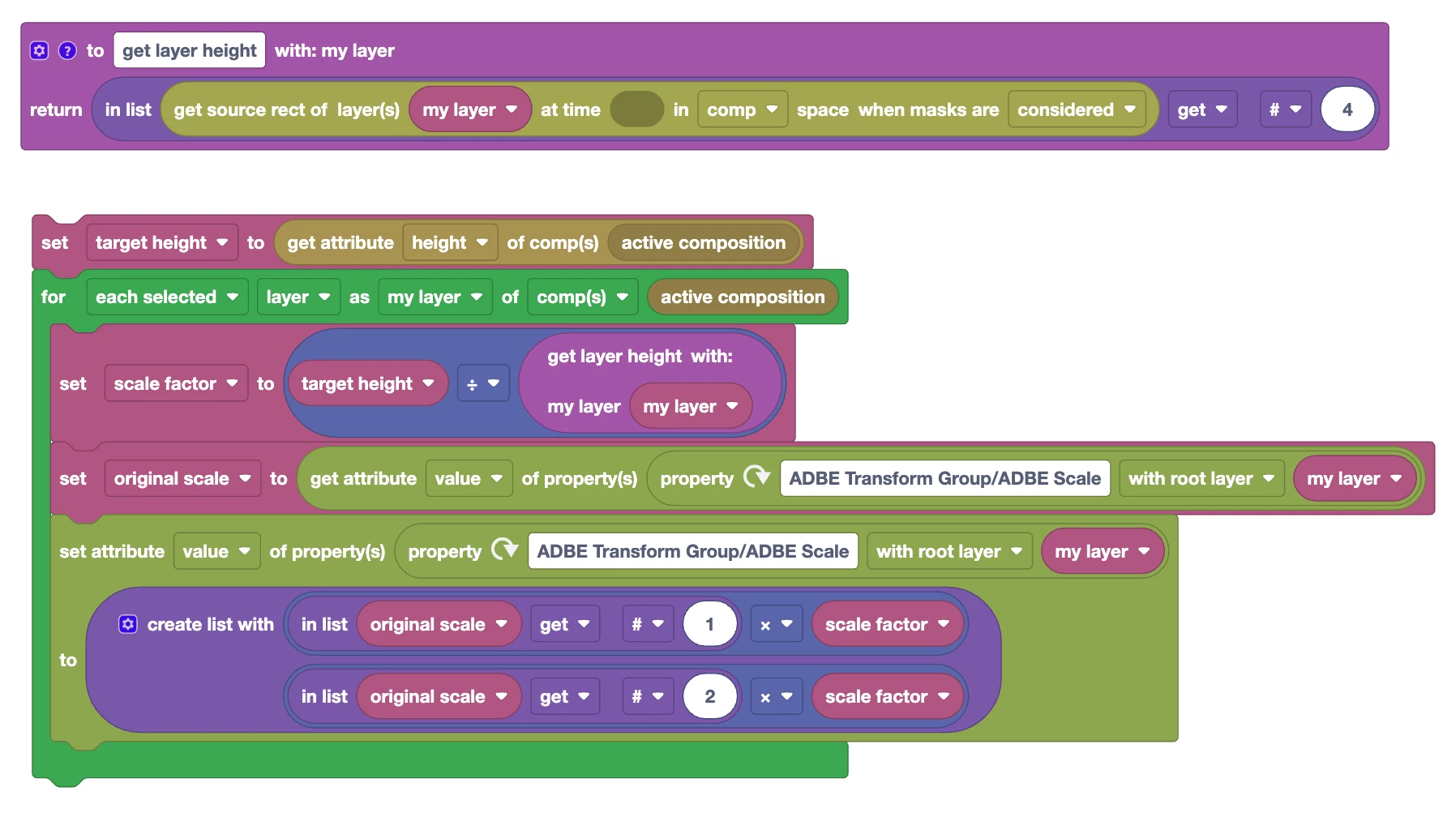
I used the tool "Scale Selected Layers to Same Width" as a starting point and modified it to scale the layers to comp height instead.


The tool uses the source rect at the current time to measure the height. This means if you have text layers, it will use the actual text as height of the layer and if you have shape layers, the actual shapes (the "height" of shape and text layers in Ae is always the same as the comp itself, but the source rect changes with the actual content). For footage layers or solids you could use the layer property "height" instead.


This is the full block code:
1 reply

Mathias Moehl
Community Expert
Mathias MoehlCommunity ExpertCorrect answer
Community Expert
October 31, 2022

I just added a tool to the Community Library of Automation Blocks for you:

Layer Properties/Scale/Scale Selected Layers To Comp Height


I used the tool "Scale Selected Layers to Same Width" as a starting point and modified it to scale the layers to comp height instead.


The tool uses the source rect at the current time to measure the height. This means if you have text layers, it will use the actual text as height of the layer and if you have shape layers, the actual shapes (the "height" of shape and text layers in Ae is always the same as the comp itself, but the source rect changes with the actual content). For footage layers or solids you could use the layer property "height" instead.


This is the full block code:

Mathias Möhl - Developer of tools like BeatEdit and Automation Blocks for Premiere Pro and After Effects
m1jackson
Inspiring
October 31, 2022

How are you making this For Loop Block?

The As and Of options don't seem to be available.


Mathias Moehl
Community Expert
Community Expert
November 2, 2022

This loop is in the layer category.
The blocks in the "Loops" category are general purpose loops.
But also the other blocks contain loop blocks (they are easy to distinguish, since they are always green). To loop over layers, look in the category "Layer", to loop over project items look in the category "Projec items" etc.

Mathias Möhl - Developer of tools like BeatEdit and Automation Blocks for Premiere Pro and After Effects