
Inspiring
July 26, 2021
Question

Bad resolution text

  • July 26, 2021
  • 2 replies
  • 665 views

I am doing this nice thing with rays behind a text. I am happy with the rays, I can improve this with curves and collor correction etc. But the letters are not so "defined" and high-rsolution. Its a 4K resolution composition. Can I correct this somehow? As far as I can see everything else is high-res. I have some bevel-alpha and I am not sure if this is the way to go. I would like 3D-letters but I must use classis3D because the text need to be in blending mode Screen. I know that you can make letters 3D by copying them multiple times and move them in Z but its some work. I have posted similar question before, I need som more suggestions how to improve the text and make it more readable and better resolution. It does not help much changing the color.
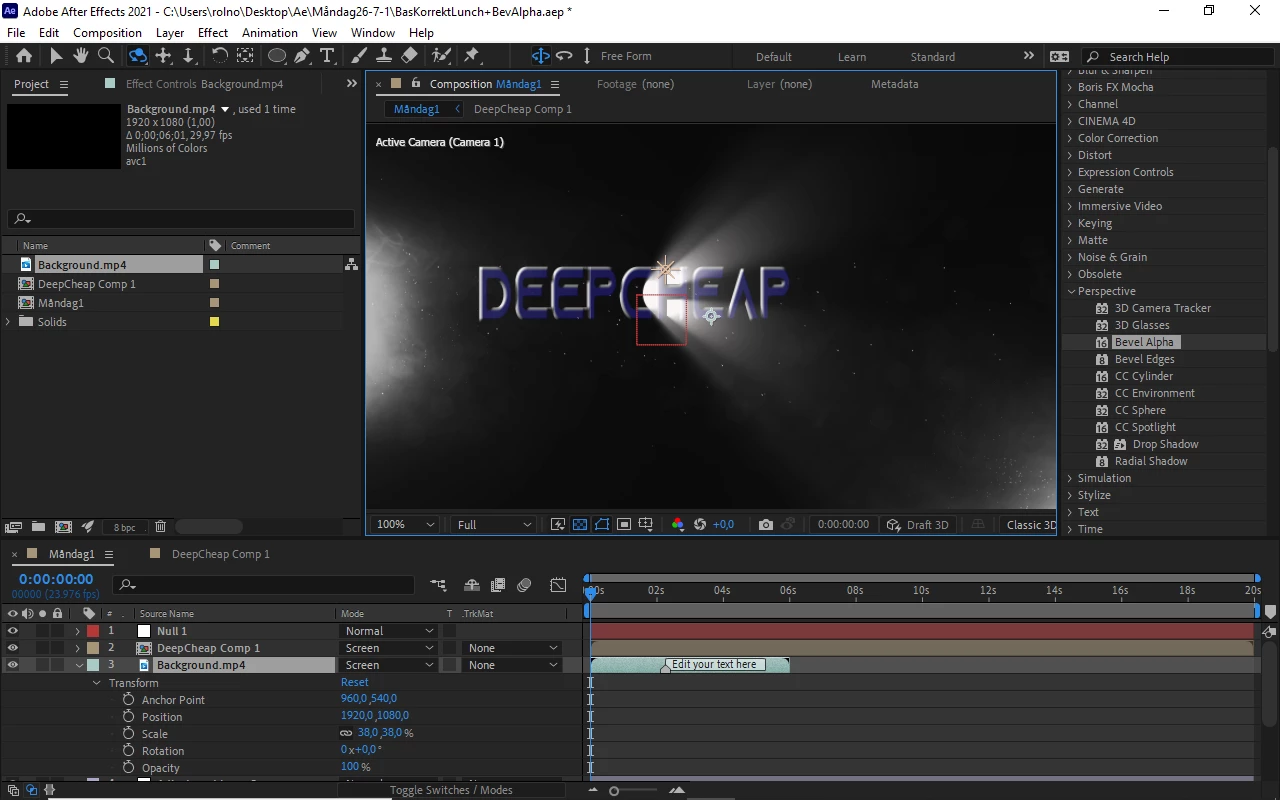
I include a printscreen.

This topic has been closed for replies.

2 replies

Community Expert
July 26, 2021

I still have no idea what is going on in the pre-comp that contains the text. I don't know what scale the text layer is. I don't know what effect you are using to create the light beams. I don't see a text layer anywhere in your screenshots. I have no idea what is in the adjustment layers. You have not collapsed transformations on the nested compositions (pre-comps) so if you scale them they will pixelate. Your camera and lights should be in the main comp. If I was trying to do what you are doing using After Effects standard set of effects I would do something like this. I rearranged the workspace so you could see all of the important modified properties.

If I had pre-composed the text layer only, everything would still work if I collapsed transformations.


If I had used Trapcode Lux none of the expressions would have been needed.  


Here are the expressions:


// applied to Bevel Alpha Light Angle
delta = toWorld(anchorPoint) - thisComp.layer("Point Light 1").toWorld([0,0,0]);
- radiansToDegrees(Math.atan2(delta[0],delta[2]))

// Applied to CC Light Burst/Center
L = thisComp.layer("Point Light 1");
L.toComp([0, 0, 0])

If you just collapse transformations on your pre-comp the quality of the text layer should improve. 


Inspiring
July 26, 2021

Thanx alot,


I think everything is OK with my composition, I have just zoomed in with the camera on text that is very small.

this way resolution gets bad. I will post full explanation so you can see everything I have done if I run in to more problems. I will change the settings on my camera.

Thanx again/Rolf

Community Expert
July 27, 2021

Zooming in means changing the focal length. Moving in means moving the camera closer to the layer. Both have the effect of scaling up the layer. If you have raster effects applied to a text layer you have turned the layer into pixels so you cannot scale up without a loss of quality. Adjustment layers can do that to text layers.


If the text layer is pre-composed you have to turn on collapse transformations to avoid the scaling problem. 

Community Expert
July 26, 2021

First, your preview mode is Draft 3D. Second, you are not showing the Switches column so I can't tell if Collapse Transformations is turned on for the nested comp and I can't see any of the modified properties on the problem text layer. I probably would not have pre-composed the text layer, I would have a camera and lights in the comp. I'm not sure why your background layer has the labeled marker on it or why it is scaled down so much. It's can not possibly fill a 4K frame. 


Dig into the nested comp (Layer 2), check the modified properties (uu). Give us some workflow details and maybe even a flow chart and we can probably help you fix the problem.

Rolf5E3DAuthor
Inspiring
July 26, 2021

I dont think its in3D-Draft, I include one image where it is in draft-3D, as you can see the radial fast blur is not visible in draft-3D. I also inklude the uu for the layers. I dont have collapsed trans. as you can see.

I remove the background, that is not my file and its not 4K. Its not important. I can use another background.

I have done pre-comp for the text-layer, why is this negative? I think everything is promising except the letters wich are looking really bad, like plastic-padding.

Thanx


Rolf5E3DAuthor
Inspiring
July 26, 2021

Here is with a spotlight, it messes with the radial fast blur and does not improve, with or without accept lights activated on the textlayer