





Answered
Bake in Text Styling expression
I’ve an interesting issue. I have spent a bit of time recreating the look of AE’s expression editor as a Per Character styling expression. It’s not complete yet, but serves my purposes… but the per-frame render time add 5s each frame. And rendering out a 90 second sequence took 90 minutes.
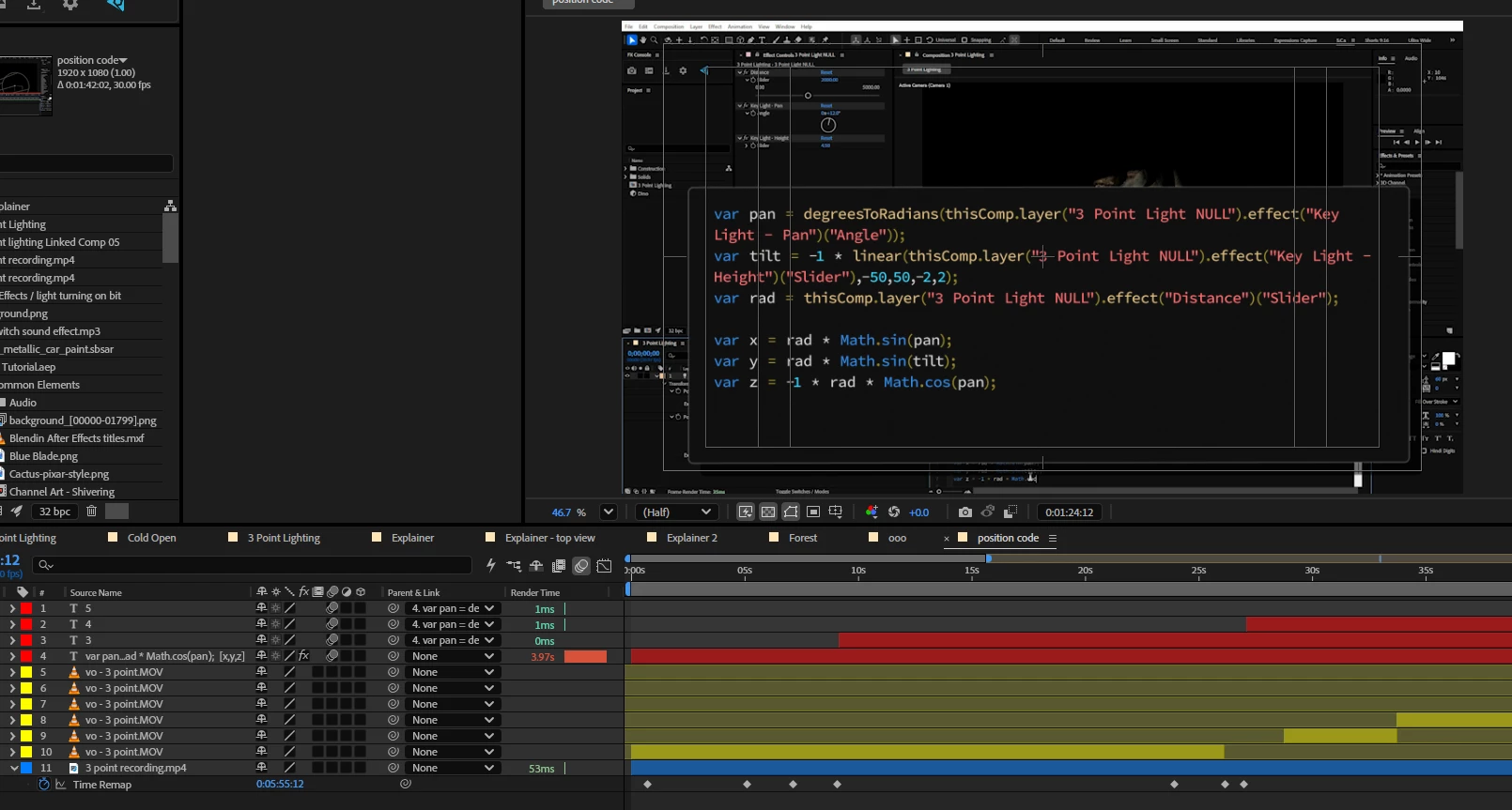
I’m wondering if there’s a way to bake the expression styling once done.
Here’s the code if anyone wants to experiment:
///// HEX COLOR CONFIGURATION //////
var hexBase    = "#D4D4D4"; // Off-white
var hexBlue    = "#3E8FE1"; // Blue (Keywords)
var hexLtBlue  = "#48D9FD"; // Light Blue (Numbers)
var hexPink    = "#F67476"; // Pink (Strings)
var hexYellow  = "#9D9039"; // Yellow (Brackets)
var hexLightYellow  = "#DCBE84"; // Yellow (reserved terms)
var hexGreen   = "#6A9955"; // Green (Comments)
var hexCursor  = "#FFFFFF"; // White (Cursor)

///// Convert Hex to AE-friendly RGB [0,1]
function hexToRgb(hex) {
    var r = parseInt(hex.slice(1, 3), 16) / 255;
    var g = parseInt(hex.slice(3, 5), 16) / 255;
    var b = parseInt(hex.slice(5, 7), 16) / 255;
    return [r, g, b, 1];
}

//// TYPEWRITER & CURSOR LOGIC
var fullText = value;
var typeProgress = effect("Typewriter")("Slider");
var charCount = Math.floor(typeProgress);
var currentText = fullText.substring(0, charCount);

var cursorChar = "|";
const blinkSpeed = 2.5;
const isVisible = Math.floor(time * blinkSpeed) % 2 === 0;
if (effect("Show Cursor")("Checkbox") == 0) {
	cursorChar = "";
}

//// Add cursor to the currently typed text
var finalDisplay = isVisible ? currentText + cursorChar : currentText + " ";

//// the Style object
var outText = createStyle().setText(finalDisplay).setFillColor(hexToRgb(hexBase));

//// Colour logic

// Blue Keywords
["var", "let", "const", "if", "Math", "continue", "push", "min", "sqrt", "else", "return", "function", "true", "false", "continue", "return", "length", "sin", "cos", "tan"].forEach(word => {
    const regex = new RegExp(`\\b${word}\\b`, "g");
    let m;
    while ((m = regex.exec(currentText)) !== null) {
        outText = outText.setFillColor(hexToRgb(hexBlue), m.index, word.length);
    }
});


/// Yellow Brackets/Punctuation
const punctRegex = /[\[\]\{\}\(\)\=\<\>\\.\;]/g;
let p;
while ((p = punctRegex.exec(currentText)) !== null) {
    outText = outText.setFillColor(hexToRgb(hexYellow), p.index, 1);
}
// Yellow Brackets/Punctuation
["thisComp", "layer", "isClosed", "inTangents", "createPath", "value", "outTangents", "frameDuration", "time", "effect", "thisProperty", "length", "linear","degreesToRadians"].forEach(word => {
    const ReservedRegex = new RegExp(`\\b${word}\\b`, "g");
    let r;
    while ((r = ReservedRegex.exec(currentText)) !== null) {
        outText = outText.setFillColor(hexToRgb(hexLightYellow), r.index, word.length);
    }
});

/////// Pink Strings
const stringRegex = /"(.*?)"|'(.*?)'/g;
let s;
while ((s = stringRegex.exec(currentText)) !== null) {
    outText = outText.setFillColor(hexToRgb(hexPink), s.index, s[0].length);
}

// Green Comments
const commentRegex = /\/\/.*/g;
let c;
while ((c = commentRegex.exec(currentText)) !== null) {
    outText = outText.setFillColor(hexToRgb(hexGreen), c.index, c[0].length);
}

// Light Blue Numbers
const numRegex = /\d+/g;
let n;
while ((n = numRegex.exec(currentText)) !== null) {
    outText = outText.setFillColor(hexToRgb(hexLtBlue), n.index, n[0].length);
}

////// style for cursor
if (isVisible) {
    outText.setFillColor(hexToRgb(hexCursor), currentText.length, 1);
}

outText

 AdChoices