


Participating Frequently
September 16, 2021
Answered

baselineLocs make me confused

  • September 16, 2021
  • 1 reply
  • 968 views

let say run this code with a text layer selected:

var cc = app.project.activeItem;
var sel = cc.selectedLayers[0];

alert(
  
  sel.text.sourceText.value.baselineLocs
  );


it always show me like 0,0,xxx,0

and the xxx is exactly the width of the text

why call it baseline?
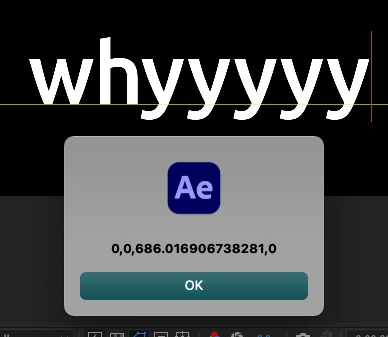
(not the green line, but red is at 686)

any idea?

This topic has been closed for replies.
Correct answer Paul Tuersley

baselineLocs gives you the x,y value of the left edge of the baseline, then x,y values for the right edge of the baseline.

If left aligned you'll see 0,0 for both and yet the longer text will have a higher x value for the right eddge as the text is longer. If center aligned both x values will change as the text is longer.

If you add those values to the Text layers Position value you'll have the absolute location of those points in a composition.

If you're seeing something else then you'll have to explain it in more detail.

1 reply

Inspiring
September 16, 2021

I presume those values are relative to the layer, so if it's left aligned the first value will be 0,0 while if centered the first of those values would be a negative value.


In order to find the absolute location in the comp you'd need to combine this with the layer's Position value. Also the values are based on the text source, so don't account for scale. You'd need to multiple the values by the scale if it isn't 100%.

Participating Frequently
September 16, 2021

yes, you are right, if change the alignment, the value will change

but how can i use this API to get the baseline position? (the green line)


change the text length, the value will also change

"why" and "whyyyy" has a different baselineLocs

this is very confuse me


Paul TuersleyCorrect answer
Inspiring
September 16, 2021

baselineLocs gives you the x,y value of the left edge of the baseline, then x,y values for the right edge of the baseline.

If left aligned you'll see 0,0 for both and yet the longer text will have a higher x value for the right eddge as the text is longer. If center aligned both x values will change as the text is longer.

If you add those values to the Text layers Position value you'll have the absolute location of those points in a composition.

If you're seeing something else then you'll have to explain it in more detail.