angel_1169
Participant
March 14, 2026
Question

Best way to migrate After Effects to new versions (plugins, animation presets, settings)

  • March 14, 2026
  • 1 reply
  • 199 views

Hello.

I would like to understand the best way to migrate After Effects when upgrading to a new version.

I recently installed After Effects 2025 while previously working in After Effects 2020. I used the “Migrate Settings” option, but I’m not sure what is actually supposed to transfer and what should be moved manually.

I would like to know what is considered the best practice when moving between versions of After Effects so that future upgrades are easier and do not break things.

Specifically:

1. What is the recommended way to migrate settings and workspace between versions?
2. How should plugins be handled when installing a new version of After Effects?  
   Should they always be reinstalled, or is it safe to copy the Plug-ins folder from the previous version?
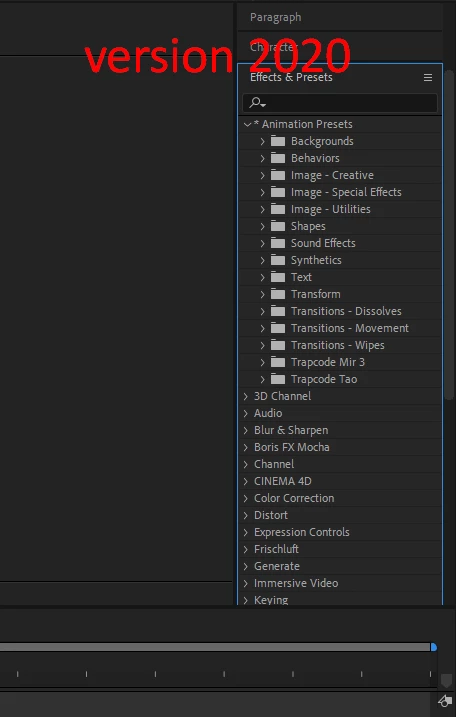
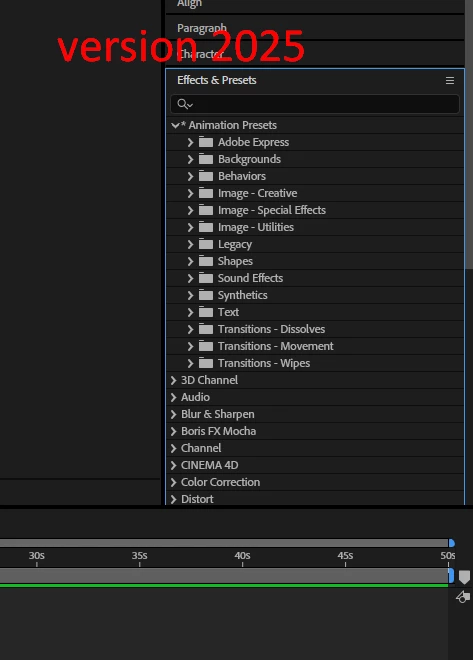
3. Some Animation Presets (for example Trapcode Mir 3 and Trapcode Tao) were visible in After Effects 2020 but do not appear in After Effects 2025.  
   Where are these presets stored and what is the correct way to migrate them?
4. Some third-party plugins that existed in the previous version are not showing in the new version.  
   Is it recommended to reinstall all plugins for each new After Effects version instead of copying them?

I would really appreciate advice on how professionals usually organize their After Effects setup so that upgrading to new versions is smoother in the future.

Thank you.


    1 reply

    ShiveringCactus
    Community Expert
    Community Expert
    March 16, 2026

    These days I keep a folder with a copy of all my presets, plugins, install licence keys etc….  Quite a lot now migrate automatically, but I just work through the list from top to bottom.  Before this I could spend a couple of hours, especially hunting emails for licence keys and purchase receipts. These days I’m done in about 20 minutes.

    angel_1169
    Participant
    March 16, 2026

    That sounds like a really good approach. Could you explain a bit more in detail how you organize that folder?
    Do you just keep the installers there, or also copies of the actual plugin/preset files from the After Effects folders?
    And where do you usually take the files from when making backups?

    Also, what do you usually do with plugins or presets that are not supported in a newer version of After Effects?
    How do you usually track plugin compatibility when moving to a new AE version?

    ShiveringCactus
    Community Expert
    Community Expert
    March 16, 2026

    Yeah, I keep the installers and a copy of the user presets.  I don’t bother with the included presets and plugins.

    Not sure what you mean about backups.  Bu5 I have them in a couple of places, but also just sitting on the hard drive ready to reinstall.

    I try to never update mid project, so if any plugins do stop working it’s sad time. I don’t tend to track compatibility, so on the rare occasions there’s been an issue, it’s not like I can do much about it.  But because I haven’t upgraded until the end of a project, I don’t lose any work if a plug-in stops working.  It’s worth bearing in mind that in almost every case, a plug-in is there to save time.  You can recreate the end results manually if needed (in some cases that might take a lot of effort and problem solving)