Participant
December 11, 2016
Question

Black and slow preview on Composition

  • December 11, 2016
  • 2 replies
  • 485 views

Hi all, i've an issue on After Effects CC 2017.

After i close the project for the first time and open it again when i start the preview i see all my composition black, and the rendering previews doesn't work properly anymore.

Is not a large project, i used 4-5 videos and i used only "timewarp" effect.

I can't resolve this problem, i need to work with after effects, i can't do it with black preview always...

i can't see ANYTHING except BLACK, and this happen only when i re-open the project.

This problem was the same on CC 2015

I tried:

-Disable all effects on videos

-Magnification zoom fit 100%

-Change preview quality

-Update GPU drivers

System info:

- Windows 10

- AMD FX-8350 @ 4.0GHz

- Sapphire Radeon R9 285 Dual X

- RAM 8GB x 2 @ 1866MHz

Pls help me, i don't know what to do...
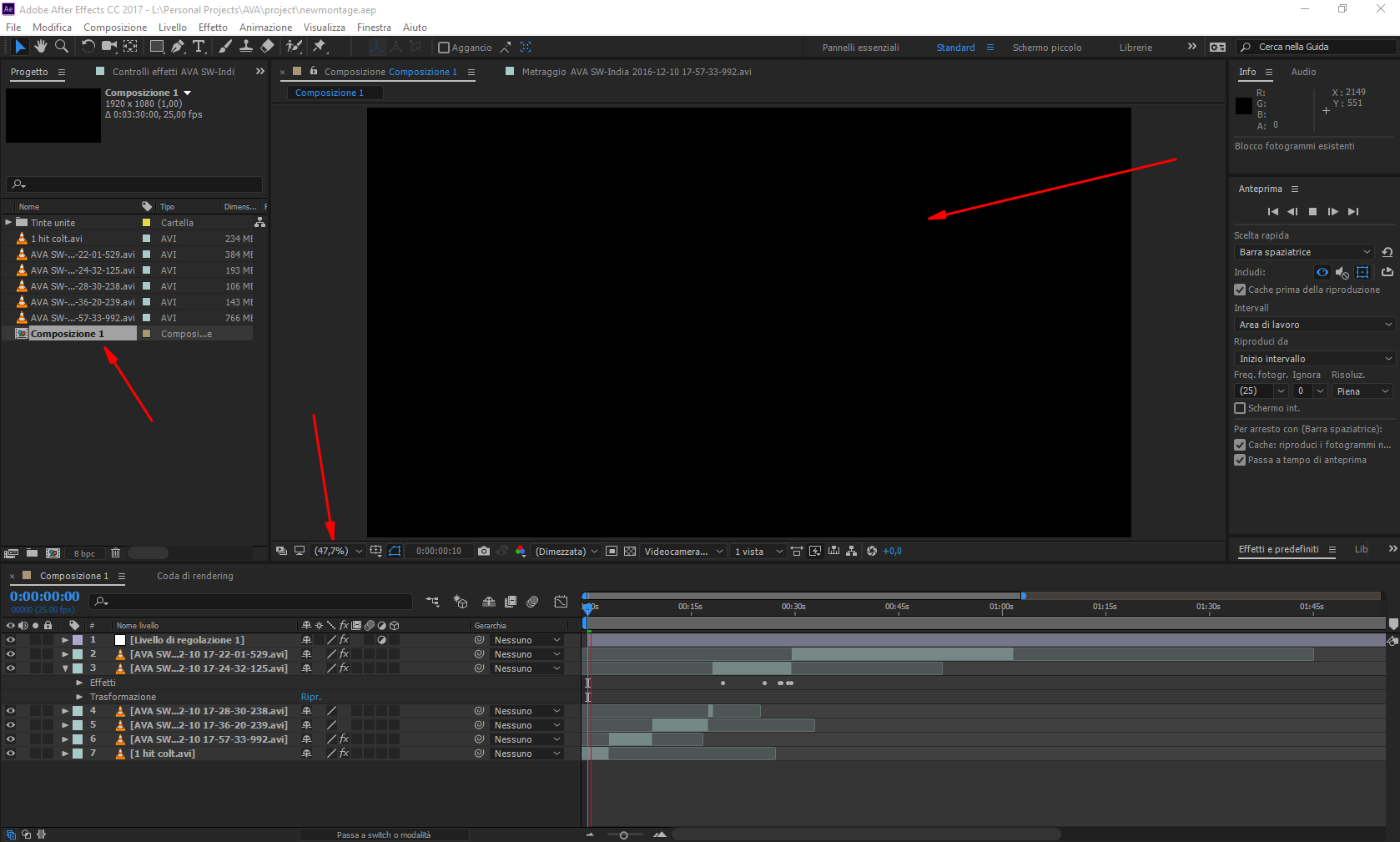
06c0b-c74c2c1e-1f81-4134-b998-8a8ddd4bb2ac.png

Eydg9f0.png

    This topic has been closed for replies.

    2 replies

    Kevin J. Monahan Jr.
    Legend
    January 18, 2017

    Hi Hokorita,

    Have you solved this problem yet? Let us know.

    Thanks,
    Kevin

    Kevin Monahan - Sr. Community and Engagement Strategist – Adobe Pro Video and Audio
    Roei Tzoref
    Legend
    December 11, 2016

    i can't see ANYTHING except BLACK, and this happen only when i re-open the project.

    let's try to isolate this problem. if you open a fresh project with a new composition and create some layers like solid, text and shapes - does it appear black too? how about importing a video file other than the ones you have in this project which .Avi which is an unpopular video that is usually related to a exporting mistake and seem suspiciously related to your problem - where are those files from? give us more information and we might be able to help you. this may be a codec problem.

    HOKORITAAuthor
    Participant
    December 11, 2016

    Roei Tzoref ha scritto:

    i can't see ANYTHING except BLACK, and this happen only when i re-open the project.

    if you open a fresh project with a new composition and create some layers like solid, text and shapes - does it appear black too? 

    When i create new solid layer when i press "ok" my GPU crashes with After effects...

    Never happened!

    I tried to reinstall my GPU drivers but same problem, crash when i create solid layer.

    No, it works fine.

    how about importing a video file other than the ones you have in this project which .Avi which is an unpopular video that is usually related to a exporting mistake and seem suspiciously related to your problem

    I tried to import an mp4 file, i put it on the composition, but when i try to preview won't work and is blocked, but if i drag the time indicator i can see something on preview, only if i drag obviously... if i stop drag it stop.

    where are those files from? give us more information and we might be able to help you. this may be a codec problem.

    The videos come from a game that called AVA (Alliance of valiant arms) and i can record inside the game, when i stop he generate an AVI file that i'm using in my project.

    Roei Tzoref
    Legend
    December 11, 2016

    sounds like a codec problem. I am guessings videos play fine in VLC player... Make sure you have quicktime installed (just the essential components) and try a different video file. Download a youtube video using a free online youtube downloader like keepvid or something. Record you screen using other export settings. You can also convert your videos using VLC player. If you have a codec pack installed then try to remove it.