
Participating Frequently
August 30, 2022
Answered

Black Object Appearing During Animation

  • August 30, 2022
  • 2 replies
  • 565 views

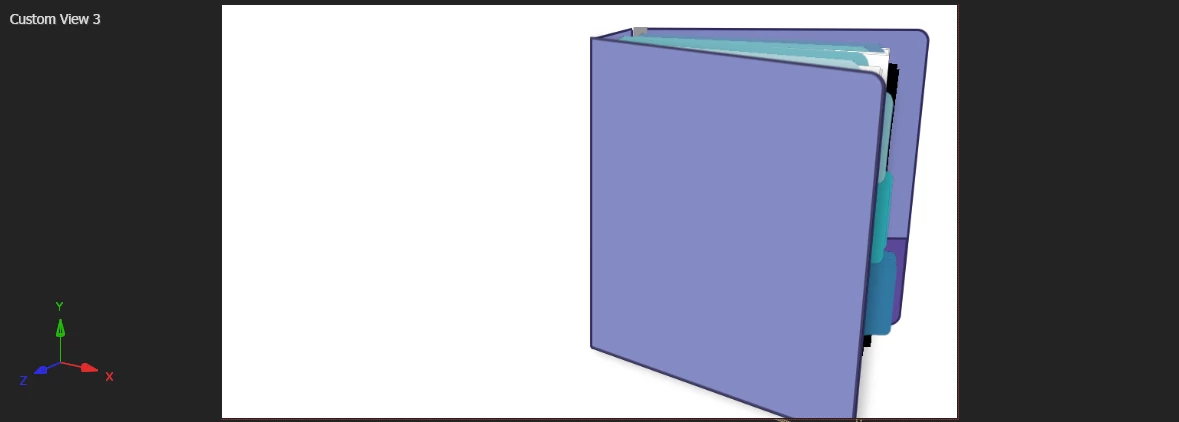
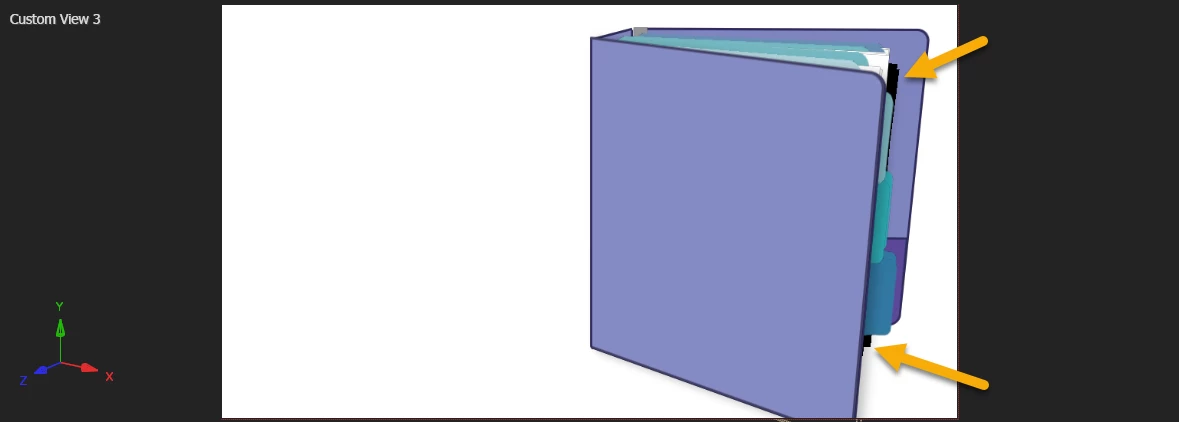
I have tried a lot of things to troubleshoot this problem. I've isolated every layer, turned on the transparency grid and individually everything looks great. But at a certain point in my animation, a black object appears and I don't know how to get rid of it. Can you please help? I've attached a screen shot of the problem and the source file.


This topic has been closed for replies.
Correct answer Jose Panadero

I cannot see your problem looking at the project but maybe it is caused by the illustrator file. Have you tried to change the renderer to Classic 3D? Not sure if you need to use the Cinema 4D renderer.

2 replies

Community Expert
August 30, 2022

You should also be aware that only the Active Camera view will render. Custom Views and the Top, Bottom, Left, Right, Front, and Back views are isometric views only useful for arranging layers in 3D space. They will not render.


The Quality settings in Cineware could also be causing the problem. Without a screenshot of the timeline with the modified properties of the problem layer showing, it's impossible to give you anything more than a guess.


Pressing the 'u' key twice will show you all modified properties. Cineware defaults to a low rez preview.

Jose Panadero
Community Expert
Jose PanaderoCommunity ExpertCorrect answer
Community Expert
August 30, 2022

I cannot see your problem looking at the project but maybe it is caused by the illustrator file. Have you tried to change the renderer to Classic 3D? Not sure if you need to use the Cinema 4D renderer.

Participating Frequently
August 30, 2022

Oh, could it be a limitation with my machine?