


Participant
Dec 23, 2024 8:09 PM UTC
Answered

black screen on after effect

Hello,

I’ve had a version of After Effects installed on my computer for some time now, and it has always worked perfectly until a few weeks ago. Since then, a blank black screen has replaced my compositions, regardless of the project I open.
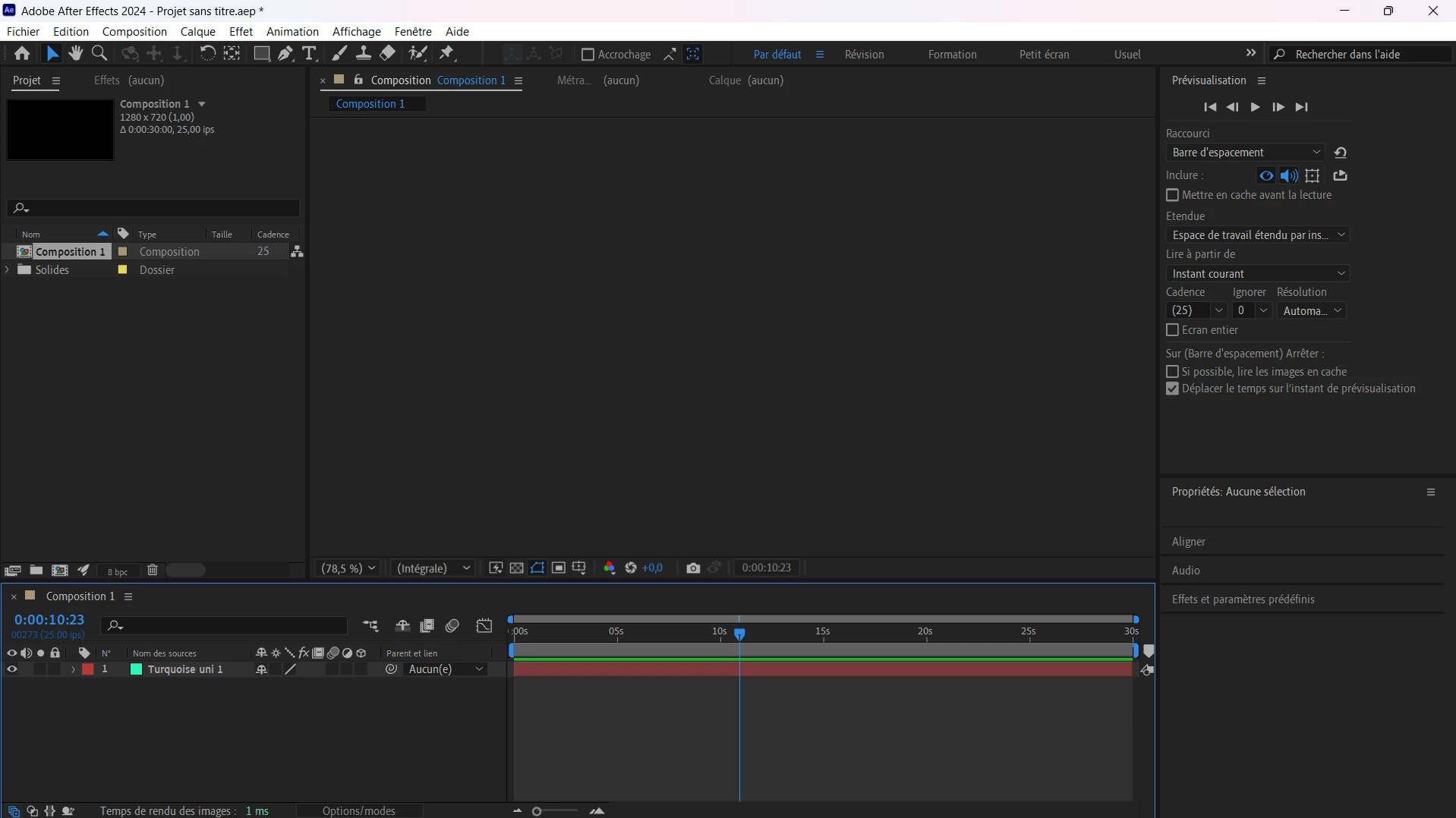
 

I’ve tried finding solutions on forums, but nothing has worked. I’ve uninstalled almost all of my software to avoid compatibility issues, changed versions of After Effects, reinstalled new drivers for my graphics card and processor… but still nothing.

I’ve restarted the software while resetting my preferences and even launched it in safe mode with Ctrl+Shift+Alt, but no improvement. Finally, I’ve tried changing the preview settings by toggling between Mercury GPU/CPU settings, but still no success.

I’m quite worried as I can’t seem to find a solution. If it helps, I’ve noticed that when I enable “full screen” in the preview settings, I experience significant display bugs but still no visual output of my scenes.

If you know of a solution, I’d greatly appreciate your help.
This software is incredibly important for my studies, and I can’t afford to continue without it.

Wishing you happy holidays,
Best regards

Before it gets suggested, I’ve already made sure the preview eye icon is enabled in my settings.

nishu_kush
nishu_kushCorrect answer
Legend
Dec 24, 2024 6:35 PM UTC

Sorry to hear about the issue. Try the following steps: 

• Close After Effects
• Go to the Device Manager (Run >> devmgmt.msc)
• Select Display Adapter, Right click on  the "Intel UHD graphic card".
• Select "Update Driver"
• Select "Browse my Computer"
• Select "Let me Pick from a list of available drivers on my Computer".
• Select "Microsoft Display Adapter".
•  Launch After Effects.

Let us know how it goes.


Thanks,
Nishu

3 replies

nishu_kush
Legend
Jan 6, 2025 4:52 PM UTC

Glad to hear that. Do you mind sharing the version number of the driver that you're using? It'll help others.


Thanks,

Nishu

Translate
Participant
Dec 25, 2024 3:44 PM UTC

Hello, I installed the Microsoft graphics driver for the Intel processor, and it worked well, but some features, like brightness adjustment, stopped working. So, I installed a newer driver, but not the latest one, to find a version that works without the bugs of the most recent one. Thank you very much, problem solved, and a great Christmas gift!

Translate
nishu_kush
nishu_kushCorrect answer
Legend
Dec 24, 2024 6:35 PM UTC

Sorry to hear about the issue. Try the following steps: 

• Close After Effects
• Go to the Device Manager (Run >> devmgmt.msc)
• Select Display Adapter, Right click on  the "Intel UHD graphic card".
• Select "Update Driver"
• Select "Browse my Computer"
• Select "Let me Pick from a list of available drivers on my Computer".
• Select "Microsoft Display Adapter".
•  Launch After Effects.

Let us know how it goes.


Thanks,
Nishu

Translate