MahaB82A
Legend
June 7, 2022
Answered

Blending Mode

  • June 7, 2022
  • 1 reply
  • 2496 views

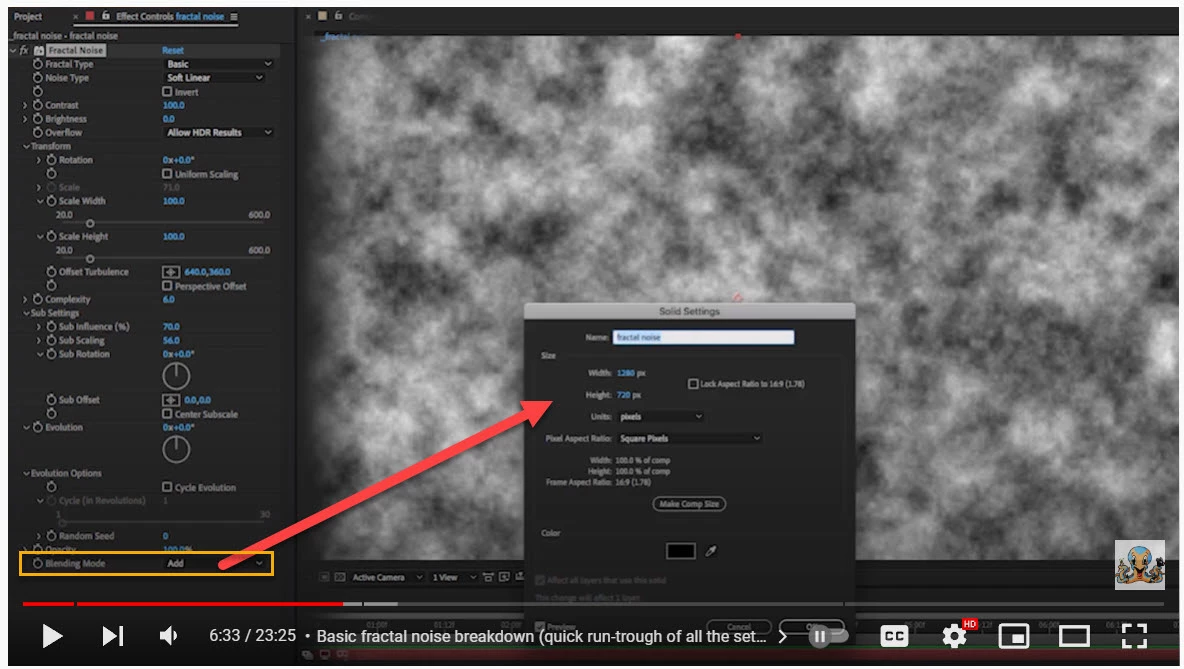
In this tutorial when Blending Mode Add is selected in the dropdown menu a window popup to select a color. Whereas in my file a window did not popup when selecting Add. How to fix it?

The Many Uses Of Fractal Noise | Part 1

time 6.33


This topic has been closed for replies.
Correct answer Rick Gerard

Getting a Blending Mode is not the issue. I get Blending Mode but seleting Add option does not popup a Solid Settings window as shown in the tutorial (time 6.33). My file video is attached.  


You get to the solid settings by selecting the layer and using the Layer menu or the keyboard shortcut Shift + Ctrl/Cmnd + y. The tutorial creator missed that part of the workflow in his explanation. I watched about 5 minutes of the tutorial, and there were several places where the author left out information that would be important to new users. Accessing the layer settings is just one of them. 

1 reply

Community Expert
June 7, 2022

The Blend Modes drop down is in the timeline. Look for the Switches and Modes Button in the lower left of your timeline. If you don't see the Switches and Modes Button you may need to click one of the 3 icons in the far lower left of the timeline.

You should see the drop down with the modes. Also, having a layer selected and holding down shift and typing + or - on your regular keyboard will cycle through the modes.

MahaB82A
MahaB82AAuthor
Legend
June 7, 2022

Community Expert
June 8, 2022

If you add a comp-sized colored solid to the timeline, add Fractal Noise, and click on Blending Mode at the bottom of the Effects control panel, you should see the blending mode options popup.


If you do not see options, start the troubleshooting by opening the Project Settings (Shift + Ctrl/Cmnd +  Alt/Option + k) and trying a different Video Rendering and Effects setting in the first tab.


If that fails, try resetting your preferences by restarting After Effects and holding down the Shift + Alt/Option + Ctrl Comand while AE opens. You can also reset preferences by opening Preferences, finding the preferences file, renaming it, and restarting AE. You'll find a link to the preferences file in the General section of Preferences right at the bottom of the page.


If that doesn't help, re-install AE or use the Creative Cloud app to update or roll back a version. You should be able to fix the problem. I don't see it listed as a bug anywhere, and Fractal Noise is working fine on my systems and all installed versions of After Effects.