Participant
Apr 5, 2018 3:49 PM UTC
Answered

BLENDING MODES DONT WORK ON 3D LAYERS!

If i select a 3d layer and try to change the blending mode of it nothing, really nothing happens.

Luchopro35Correct answer
Participant
Jun 13, 2024 5:26 PM UTC

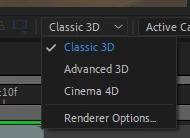
Esto ocurre porque está activada la opción "advance 3d" toca cambiarlos la opción "Classic 3D" .

This happens because the "advance 3d" option is activated; you have to change the "Classic 3D" option.

6 replies

Luchopro35Correct answer
Participant
Jun 13, 2024 5:26 PM UTC

Esto ocurre porque está activada la opción "advance 3d" toca cambiarlos la opción "Classic 3D" .

This happens because the "advance 3d" option is activated; you have to change the "Classic 3D" option.

Translate
Participant
Mar 15, 2025 1:09 AM UTC

you is a hero


Translate
Participant
Apr 17, 2024 4:13 PM UTC

You can try precomposing the layer you want to blend (leaving attributes)
Then set the blending mode you want within the precomp then back in the main comp toggle the Continuous Rasterize box.


This worked for me in the new Advanced 3D mode 

Translate
Participant
May 22, 2024 2:50 PM UTC

This worked for me as well. Thanks for the tip! 

Translate
Kyle Hamrick
Community Expert
Community Expert
Apr 5, 2018 6:04 PM UTC

It's tough to tell from the quality of your screen capture, but if your 3d renderer is set to the Cinema4D renderer, blending modes (and several other things) are disabled. You can change this in Composition Settings > 3D Renderer, or by clicking the little box in the top right of your comp viewer.

Translate
Simfdawg
Participant
Sep 2, 2021 4:41 PM UTC

thank you for sharing your wisdom, this was fustrating me beyond what i like to admit

Translate