
maryhawkins
Participating Frequently
April 19, 2021
Answered

Blurry AE UI?

  • April 19, 2021
  • 2 replies
  • 2132 views

I thought there was something wrong with my iMac's monitor or my eyes, but my AfterEffects 2021 UI is actually the culprit. The whole UI is blurry, as if someone had chosen the wrong setting somewhere. I assumed I was that person who used the wrong settings, but I can't find anything in preferences to help. Here's a screenshot of "Preferences" from the header of my preferences, just to show how things look on my Retina 5K, 27" monitor. If you look closely at the text palette that I've screenshotted, you can see how all of the T icons are soft around all of the edges, and the 00s are blurry enough that you can see them melting into each other where they overlap. These details are about the same size as the smallest type on this help webpage, which is clean and crisp.


Any ideas? Anyone else seeing this? It makes it really hard to see details in the UI, and being able to see tiny type and little icons is very imporant when you're using a complex program like AfterEffects on a big monitor. I can lean in and see the pixelization on icons and text. My actual renders and compositions are fine.
This topic has been closed for replies.
Correct answer Conrad_C

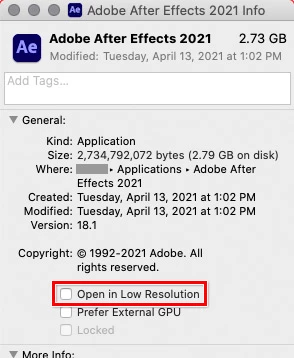
This is just a guess, but it’s all I can think of: If you go into the Finder, then go into the Applications folder, and select the Adobe After Effects application (not folder) icon, and then choose File > Get info, what is the state of the option highlighted in the figure below? It should normally be deselected.


2 replies

Conrad_C
Community Expert
Conrad_CCommunity ExpertCorrect answer
Community Expert
April 21, 2021

This is just a guess, but it’s all I can think of: If you go into the Finder, then go into the Applications folder, and select the Adobe After Effects application (not folder) icon, and then choose File > Get info, what is the state of the option highlighted in the figure below? It should normally be deselected.


maryhawkins
Participating Frequently
April 23, 2021

Oooh! That was it! The UI looks so much better now. I was worrying that my eyesight was failing or something. Thank you!

Jose Panadero
Community Expert
Community Expert
April 19, 2021

In older versions of macOS you have a control about that in the System Preferences > General. There is something about font smoothing when it is available. Check if you have activated this option.

maryhawkins
Participating Frequently
April 19, 2021

I'm using BigSur, 11.2.3, and I don't see that in there. Sigh...


Illustrator and Photoshop are nice and crisp. It's something specific in AfterEffects.

maryhawkins
Participating Frequently
April 19, 2021

Here are screenshots from Photoshop and Illustrator from the same computer. Look at how clean the UI elements are compared to AE. All of the lines are clear, all of the type is crisp. The type and icons are a little bigger in AI and PS, but what's really noticable is how blurry everything is in AE. What gives?!