Inspiring
April 12, 2022
Answered

Blurry text with 3D camera

  • April 12, 2022
  • 2 replies
  • 1811 views

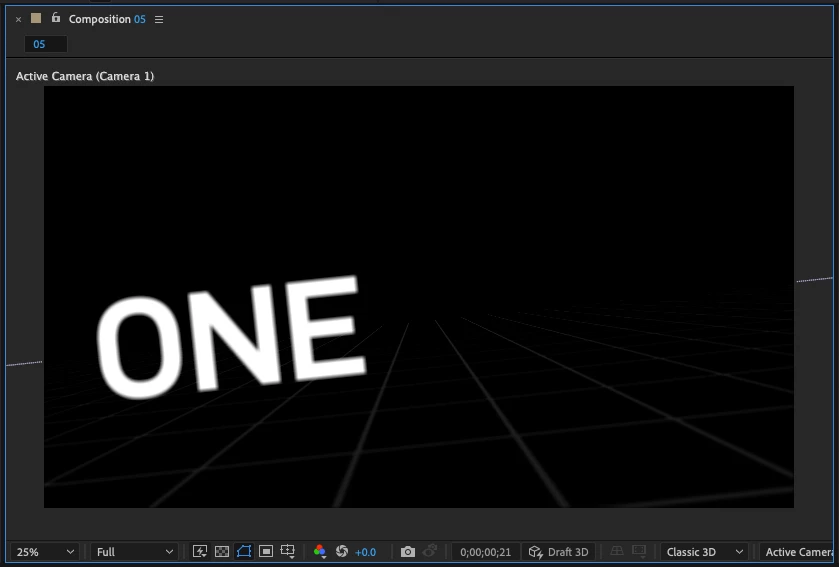
I'm finding that my text objects are quite blurry when using 3D cameras.

My zoom is set to 25% and the font size is 72px.

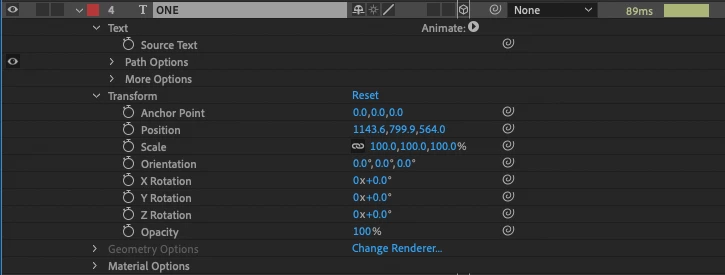
I've pasted screengrabs below, are there any other factors that can affect something like this?


This topic has been closed for replies.
Correct answer Andrew Yoole

Do you have Depth of Field turned on in your camera?  If you do, and you don't have your focus point aligned to the distance between your text and camera, then it'll be blurry.  If you don't need DOF, turn it off.  If you do, you'll need to adjust your focus distance whenever the camera or text layers moves in space, or link the two with an expression so they're always correct.

2 replies

Andrew Yoole
Andrew YooleCorrect answer
Inspiring
April 12, 2022

Do you have Depth of Field turned on in your camera?  If you do, and you don't have your focus point aligned to the distance between your text and camera, then it'll be blurry.  If you don't need DOF, turn it off.  If you do, you'll need to adjust your focus distance whenever the camera or text layers moves in space, or link the two with an expression so they're always correct.

mttplbkpAuthor
Inspiring
April 12, 2022

Also I've found that enabling 'Draft 3D' will take the blurriness away, but the edges will then turn really jagged