
Participant
October 10, 2018
Answered

Boundary box around shape

  • October 10, 2018
  • 2 replies
  • 8572 views

Hello all,

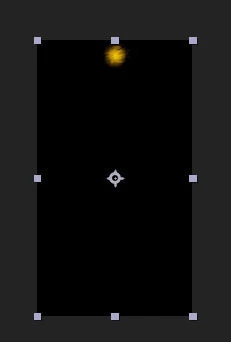
I am currently wondering how to adjust the bounding box around shapes in After Effects. I have a file imported from illustrator and the bounding box for the object is the size of the composition. How do I go about fitting the bounding box to the shape. Here is a snap shot of what I am talking about. I have a sun I made but the frame is way to big!
    This topic has been closed for replies.
    Correct answer Byron Cortez

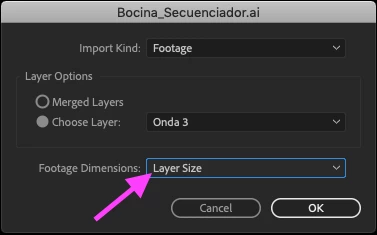
    When you import an .AI file in After Effects you will see the import options, put these options especially Layer Size. If you put these options and still appear to the same size then check inside your Illustrator project for sure you left something for the bottom of your workspace.

    2 replies

    Byron CortezCommunity ExpertCorrect answer
    Community Expert
    October 10, 2018

    When you import an .AI file in After Effects you will see the import options, put these options especially Layer Size. If you put these options and still appear to the same size then check inside your Illustrator project for sure you left something for the bottom of your workspace.

    Byron.
    Participant
    October 11, 2018

    Great! This does the trick! thank you

    Community Expert
    October 11, 2018

    You're welcome!

    Byron.
    Community Expert
    October 10, 2018

    The boundary box is determined by the size of the layer that created it when you import an AI file with retain layer size selected. If it is larger than the actual vector illustration the first thing to check is the layer in AI. Just about anything can affect the layer size. A shape used as a layer mask that extends beyond the artwork fouls things up. The size of the artwork before a layer was masked can foul things up.

    If that doesn't fix the bounding box size you can simply create a layer mask. You'll have to move the anchor point.