MahaMN
Apr 1, 2025 9:28 AM UTC
Answered

Bounding Box Hide the Gap

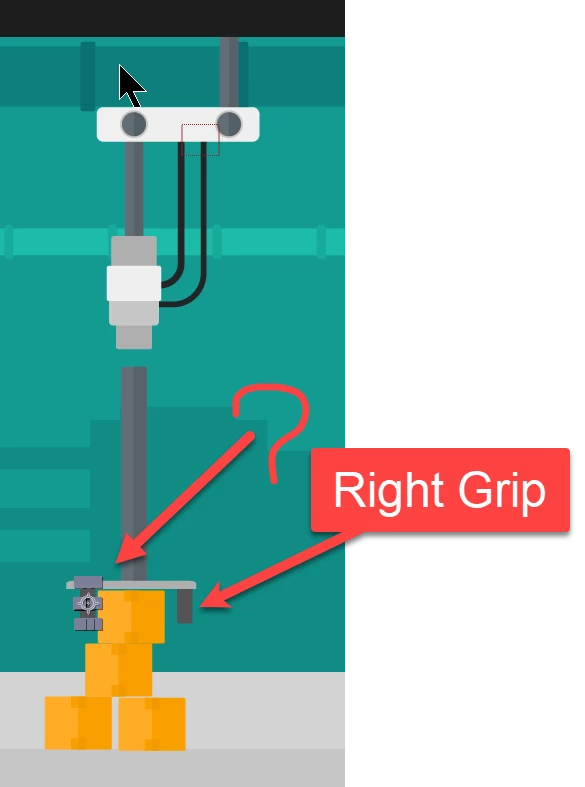
In this Left & Right grip should hold the box, Bounding Box hides the gap between grip & box. Is there any way to switch off the grip Bounding Box temporarily?

 

nishu_kush
nishu_kushCorrect answer
Legend
Apr 3, 2025 4:52 PM UTC

It did not work because tool is inactive. But I did in a different way: zoom in & proceed. 


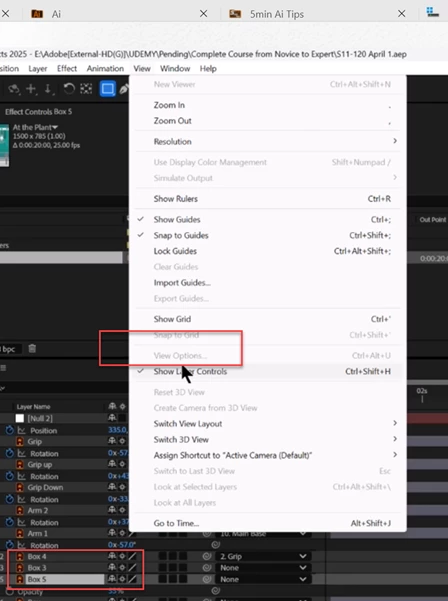
You need to highlight the Composition Panel. In the screenshot, the Timeline panel is highlighted. Click anywhere in the Composition panel to highlight it.

Let me know if that works.


Thanks,
Nishu

6 replies

nishu_kush
Legend
Apr 1, 2025 1:35 PM UTC

Thanks for writing in, Maha.


Go to the View menu > View Options > uncheck Layer Controls.

Let us know if this is not what you're looking for.


Thanks,
Nishu

Translate
MahaMN
MahaMNAuthor
Apr 1, 2025 4:05 PM UTC

Sorry there was a mistake & it has been corrected in my post. Please see that again.

Translate
nishu_kush
Legend
Apr 2, 2025 7:52 PM UTC

As I can understand, you want to disable the layer's bounding box so that objects are visible. The steps above do the same.

Let me know if that doesn't help.


Thanks,
Nishu

Translate