
Participant
August 8, 2018
Answered

Box surrounding text with bounding box

  • August 8, 2018
  • 1 reply
  • 4209 views

Hi all,

Can someone please help me. I want to create a text layer (with a bounding box) and have a regular box shape (using RectAtTime script) behind it reshape to match the height/width of the text. I can get it to work with text layers that 'don't' have a bounding box.
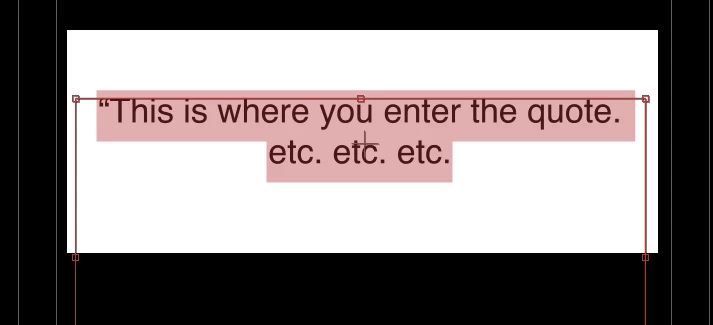
I have also added script so that the text will vertically center itself. Is there an easier way? I don't know how Adobe haven't added this as a standard feature by now.

Thanks in advance for any help.

David.

    This topic has been closed for replies.
    Correct answer Szalam

    There are ways to do this sort of thing, but they involve very interesting expression stuff.

    I can certainly understand wanting and easy way to do that sort of thing. Please check and see if someone has made a request like this in the User Voice page and upvote it. If nobody has, make a feature request of your own! After Effects: Hot (725 ideas) – Adobe video & audio apps

    1 reply

    Mylenium
    Legend
    August 8, 2018

    I don't know how Adobe haven't added this as a standard feature by now.

    The whole point of  paragraph text is to align the text relative to a user-defined bounding box, which ultimately is totally arbitrary depending on the formatting. I fail to see why it should be any different. As far as I'm concerned you are simply usingh a wrong approach and in your image I see nothing that couldn't be done with normal line-based text, text animators and possibly pre-composing and effects.

    Mylenium

    Participant
    August 8, 2018

    I think you missed my point. Perhaps I didn't explain myself well enough.

    Firstly... We do a lot of copying and pasting text from Word into After Effects (long quotes). I am using a bounding text box so I don't have to adjust each line. I also want that text (either being 1 line or several lines typed) to vertically center dynamically in its position so I don't have to manually adjust it (position) each time. After Effects does 'not' let you do this (without scripting).

    I then want a self-resizing box to sit behind that text (being the width/height of that text paragraph)

    As I mentioned, I can get that work work with a standard text layer, but as soon as I use a bounding box, the self-resizing box only sees the width/height of the bounding box, and not the actual text within the bounding box..

    I hope that made more sense.

    This is what I want to create:

    ..but I simply want to paste some text in to a text layer, it constrains and the box automatically reshapes to the length/height of that text.

    Thanks.

    Cheers,

    David

    Mylenium
    Legend
    August 8, 2018

    I still dont get why you insist on using paragraph text. None of what you describe would be un-doable using normal line text with e.g. vertical centering merely being a matter of using a text animator set to Line mode and a simple expression calculating the number of lines, give or take the initial tweaking when creating the template. I'm afraid you have locked yourself into a specific way of thinking and are working against the program, not with it, so of course what you wanbt will be difficult or impossible to implement.

    Mylenium