

Buffer expansion clamped if Compositing Options -> opacity <100%
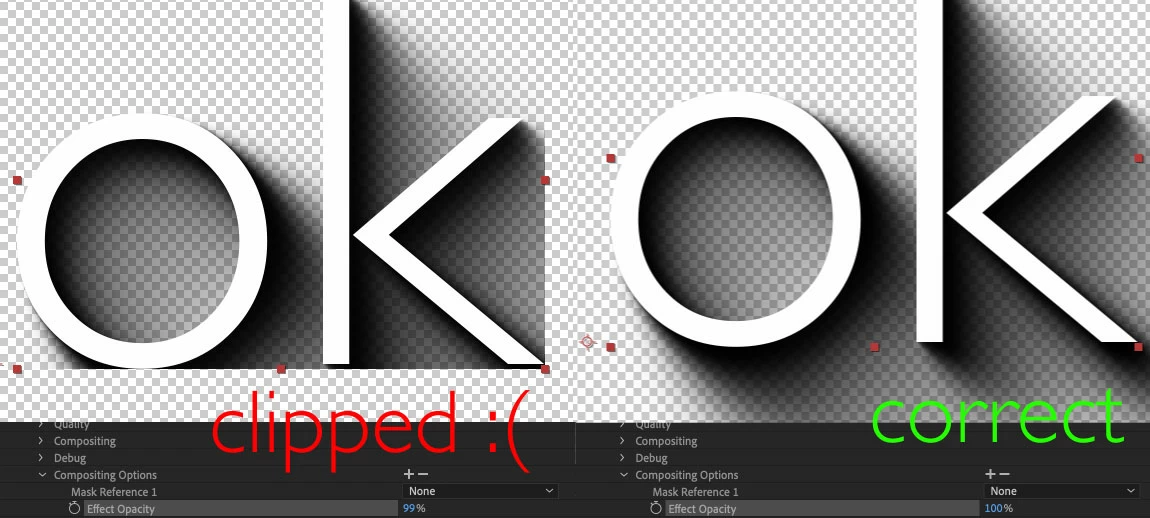 Hi. I have a drop shadow plugin that expands the buffer in smart FX by increasing the
extra->output->result_rect and extra->output->max_result_rect and this works except if the compositing options -> opacity is set to less than 100% or a mask is applied.
In this case, extra->input->output_request.rect becomes the size of the original input, and even though my output buffer is expanded, it's being clipped to the smaller extra->input->output_request.rect. So my question is, how can I tell AE I need to expand the extra->input->output_request.rect? I tried just modifying it inside pre-render but it reverts back to the original size in smart render, so my changes were disregarded.
The AESDK sample Resizer works correctly even with compositing options, but it's not using smartFX so I can't copy it's behaviour.


 AdChoices