
February 15, 2022
Question

Bug in property or method error?

  • February 15, 2022
  • 3 replies
  • 1367 views

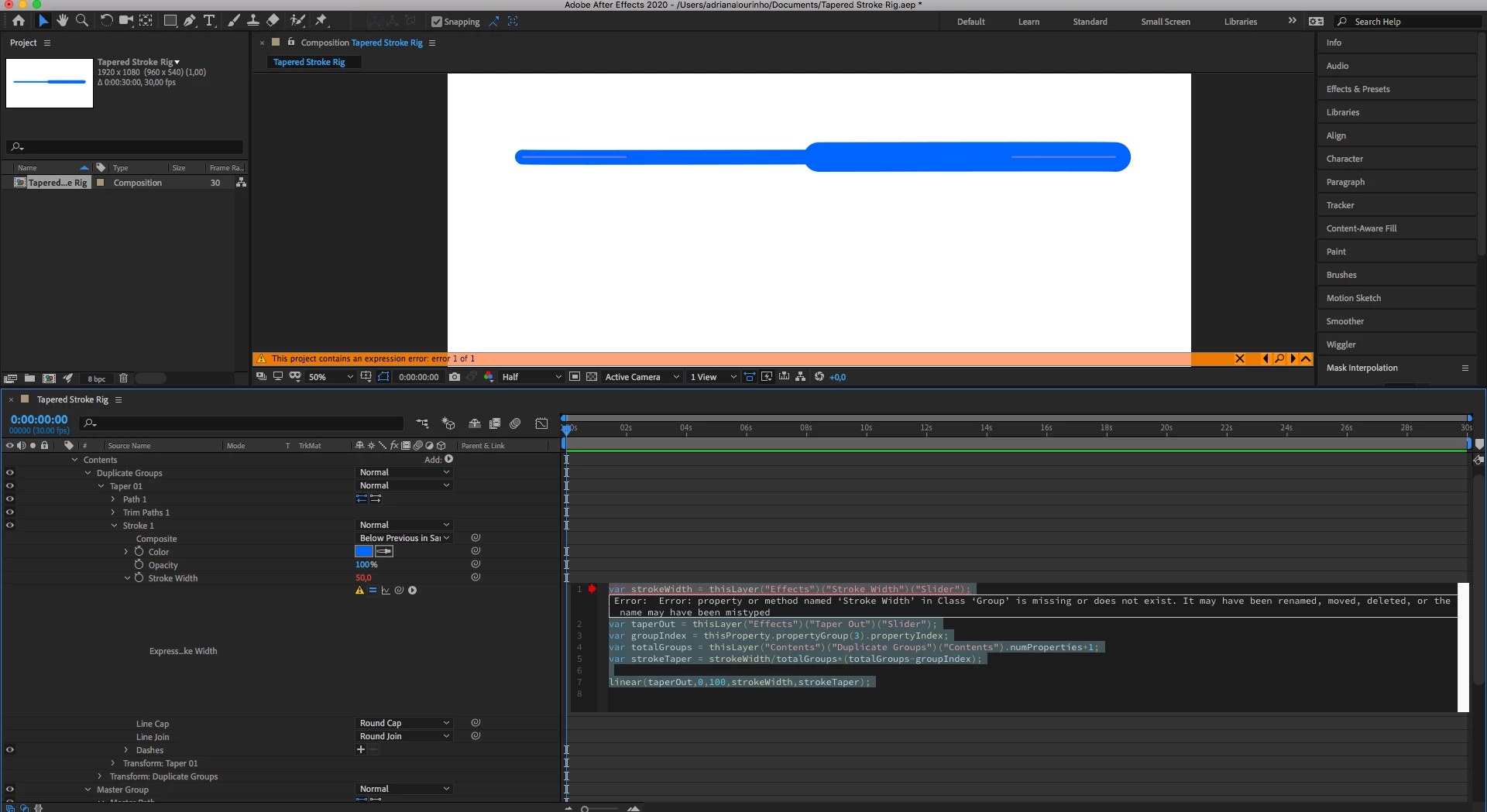
Hi, I was following a tutorial and despite everything being correct I got an error several times (this is my first time working with expressions). However, when I renamed the source name, the error disappeared and everything worked correctly. At the end of the tutorial the error reappeared when I wrote the code (the error is in the print screen), but I can't rename the Stroke Width source and the bug precists. Does anyone know how I can get around this? 
 

This topic has been closed for replies.

3 replies

Community Expert
February 18, 2022

Try this expression for Stroke Width:

strokeWidth = effect("Stroke Width")("Slider");
taperOut = effect("Taper Out")("Slider");
groupIndex = thisProperty.propertyGroup(3).propertyIndex;
totalGroups = thisLayer("Contents")("Duplicate Groups")("Contents").numProperties;
strokeTaper = strokeWidth / totalGroups * (totalGroups / groupIndex);

easeIn(taperOut, 0, 100, strokeWidth, strokeTaper);

 I don't use var because it is redundant. 


The code should work as long as you have Effects Control Sliders named "Stroke Width" and "Taper Out" on the shape layer.


The tutorial is a little long-winded, and unfortunately, the author uses a paid 3rd party script to help write the expressions, so users that have not purchased the same tool don't see what is on the screen, 


The tutorial is not exactly how I approach the problem of creating a tapered stroke. It's a little clunky, but it should work. The workflow is viable if you cannot update to a version of AE that offers Tapered Strokes.

Mylenium
Legend
February 16, 2022

Again - technically the syntax is not correct. Anything beyond that would requzire to know what tutorial you are actually referring to.


Mylenium

February 16, 2022

Yes, I downloaded the tutorial file and the syntax is different. But even with the right syntax, I get the same error. his is the Tutorial link https://www.youtube.com/watch?v=to0WiXD5b9U

Thank you for your answers.

thepixelsmith
Community Expert
Community Expert
February 16, 2022

The first thing is that is an older tutorial, strokes on shape layers now have a taper property. Yo can probly do everything you want by just draing a line, giving it s stroke and then setting the taper, and trim path properties. You would animate offset in trim path to move the line around.


"Effects" is looking for an effect on the current layer called "Stroke Width" are you sure that effect is present on the layer?

Also make sure the names are spelled exactly the same this included capitalization and spacing.

Many problems with code are user errors, typos and stuff like that.


If it isn't an error on your part.

The other possibility, may be it is so old it need the extendscript library.

File > Project Settings > Expressions 

Change the engine to Legacy Extendscript.

Mylenium
Legend
February 16, 2022

The slider references don't make any sense. The way they are written "Effects" only makes sense if there is an effect of such name or a pseudo-effect. This is not AE's fault. You're missing something critical about the tutorial or it's simply not explained properly. Find a better tutorial.


Mylenium

February 16, 2022

Thank you for your answer. From what I understood in the tutorial, the ("Effects") and ("Slider") are the references to the Effect Control. The way he explains it makes perfect sense, because these are the Effect Controls that will manipulate the Shape Layer properties. This is a rig for Tapered Stroke with expressions. As I mentioned, everything worked correctly whenever I was allowed to change the source name of the property. So I believe it's a bug. 

February 16, 2022

And by saying "change the source name of the property" all I did was write the same name again and AE recognized it, and the error was gone.