
claire334
Participating Frequently
June 8, 2022
Answered

Call image in pre composition by name with expression

  • June 8, 2022
  • 2 replies
  • 1272 views

Hi,


I have in my projects for example 3 images:

- a.jpg

- b.jpg

- c.jpg

I have a pre composition named "My_images" which contains: a.jpg, b.jpg and c.jpg

Is it possible with expression to call if i want: a.jpg OR  b.jpg OR c.jpg.


Thank you in advance.


Cordially


Claire
This topic has been closed for replies.
Correct answer Mathias Moehl

>on each precomp layer, which is an instance of that precomp, there would be a copy of that slider

How would you do that? Admittedly, my knowledge of essential graphics is pretty limited, and I'd love to see it if you could throw together a simple project that demonstrates this.


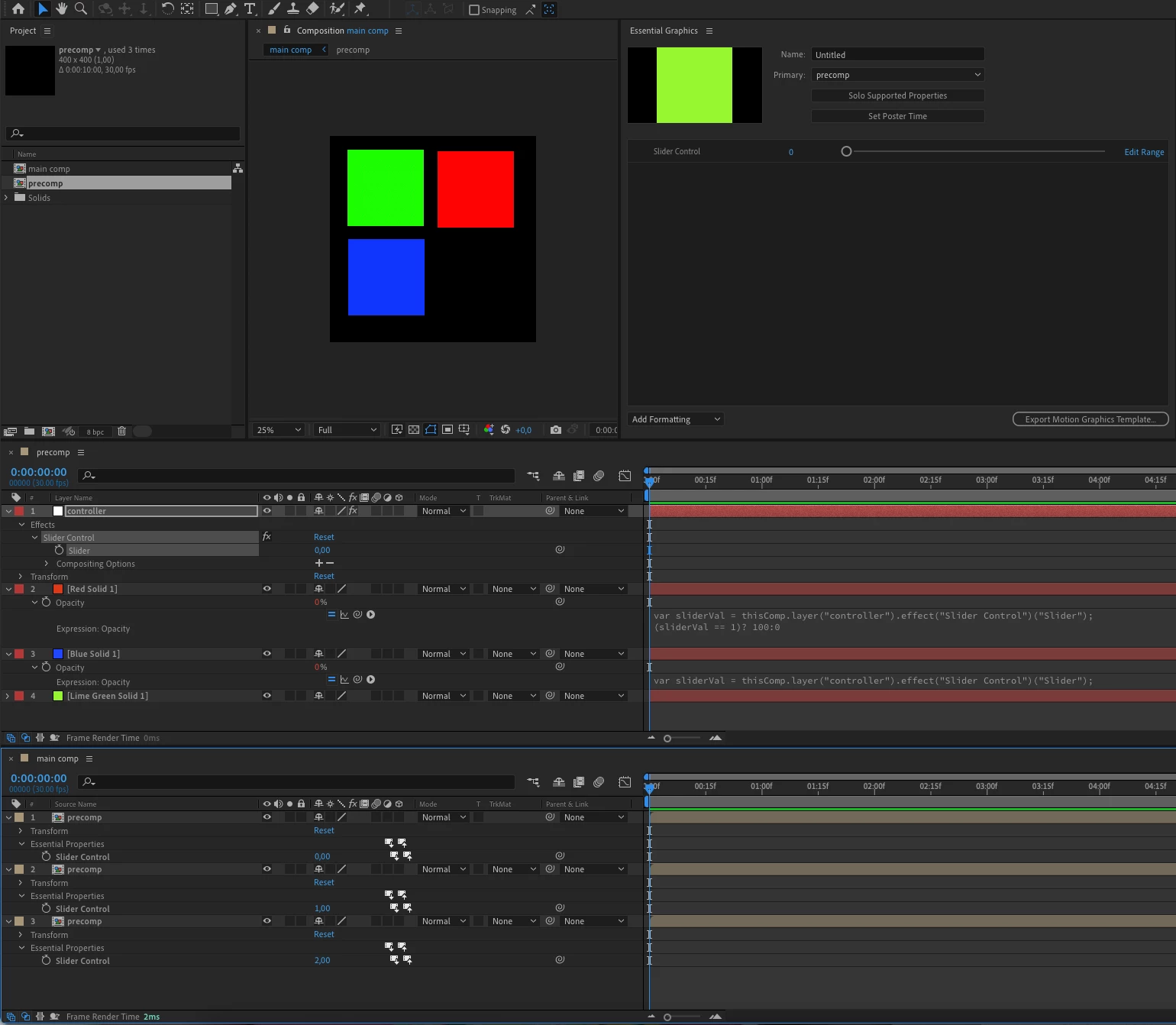
Here I have a precomp with three solid layers. A slider in the precomp controls the opacity of all of them. The slider has been added as Essential Property, such that it shows up as a control on the precomp layers in the main comp. There I set the slider value to three different values, in order to get three different variants how the precomp is looking.
You can download the aep file here:
https://www.dropbox.com/s/84v6insg4jzw674/choose_layer_in_precomp_with_slider.aep?dl=0

2 replies

Mylenium
Legend
June 8, 2022

What you want is not possible. A pre-composition is always just an instance of the same comp and responds to the same changes globally. Even all Essential Graphics/ Master property trickery doesn't change that. You have to use a different workflow like staggering the images and accessing them via time-tremapping, which then could be rigged with a valueAtTime() expression or even a simple slider. Similarly, you can use all sorts of effects to "unhide" layers by rendering them inside the effect while it's otherwise invisible by referencing the effect in one of the effect's input dropdowns. This then again could be controlled with expressions. Either way, your original idea will never work and even in the scenarios I laid out you can't avoid duplicating the pre-comp at least occasionally.


Mylenium

Mathias Moehl
Community Expert
Community Expert
June 8, 2022

Would it work to have

- a slider control effect inside the precomp

- expressions on layers A, B, and C's opacity which turn exactly one of them to 100%, depending on if the slider has value 1,2, or 3.
- make the slider a essential property.
Now you can choose with the essential property in each precomp layer main comp, which image you want to use.

Mathias Möhl - Developer of tools like BeatEdit and Automation Blocks for Premiere Pro and After Effects
Dan Ebberts
Community Expert
Community Expert
June 8, 2022

It doesn't seem like that will work. There's still only one slider and one precomp, right?

Dan Ebberts
Community Expert
Community Expert
June 8, 2022

I'm not sure what you're asking, but if you do something like this:

myLayer = null;
try{
  myLayer = comp("My_images").layer("a.jpg");
}catch(e){
  try{
    myLayer = comp("My_images").layer("b.jpg");
  }catch(e){
    try{
      myLayer = comp("My_images").layer("c.jpg");
    }catch(e){
    }
  }
}

at the end, myLayer will be a.jpg, b.jpg, c.jpg, or null (if a, b, and c don't exist). Does that help?

claire334
claire334Author
Participating Frequently
June 8, 2022

Thank you for your answer first.

Sorry i will be more explicit.

This is what i want, i add in my composition two times the pre composition "my images".

1) First time i use "my_images": i want to hide a.jpg and c.jpg for example and also keep only b.jpg

2) Second time i use "my_images:i want to hide a.jpg and b.jpg for example and also keep only c.jpg


To ask this question in a general way, how to change values of layers (opacity, scale) from a precomposition containing several layers (images for example). My goal is to use the same precomposition that contains a lot of images multiple times and only using expression to select what image(s) i want to see in my composition.


Thank you in advance.

Dan Ebberts
Community Expert
Community Expert
June 8, 2022

Ah, OK. I think the only way you could do something like that would be to set your precomp up so that each image is visible for a specific amount of time ( 1 frame, 1 second, etc.) and then time remap each precomp layer instance and set the time remapping time corresponding to the image you want active. You can't do it directly, the way you're suggesting, because you can't have differenet layer instances of the same precomp render differently (the precomp only renders once).