Can figure out how to work Puppet tool multiple layers. Any tips?
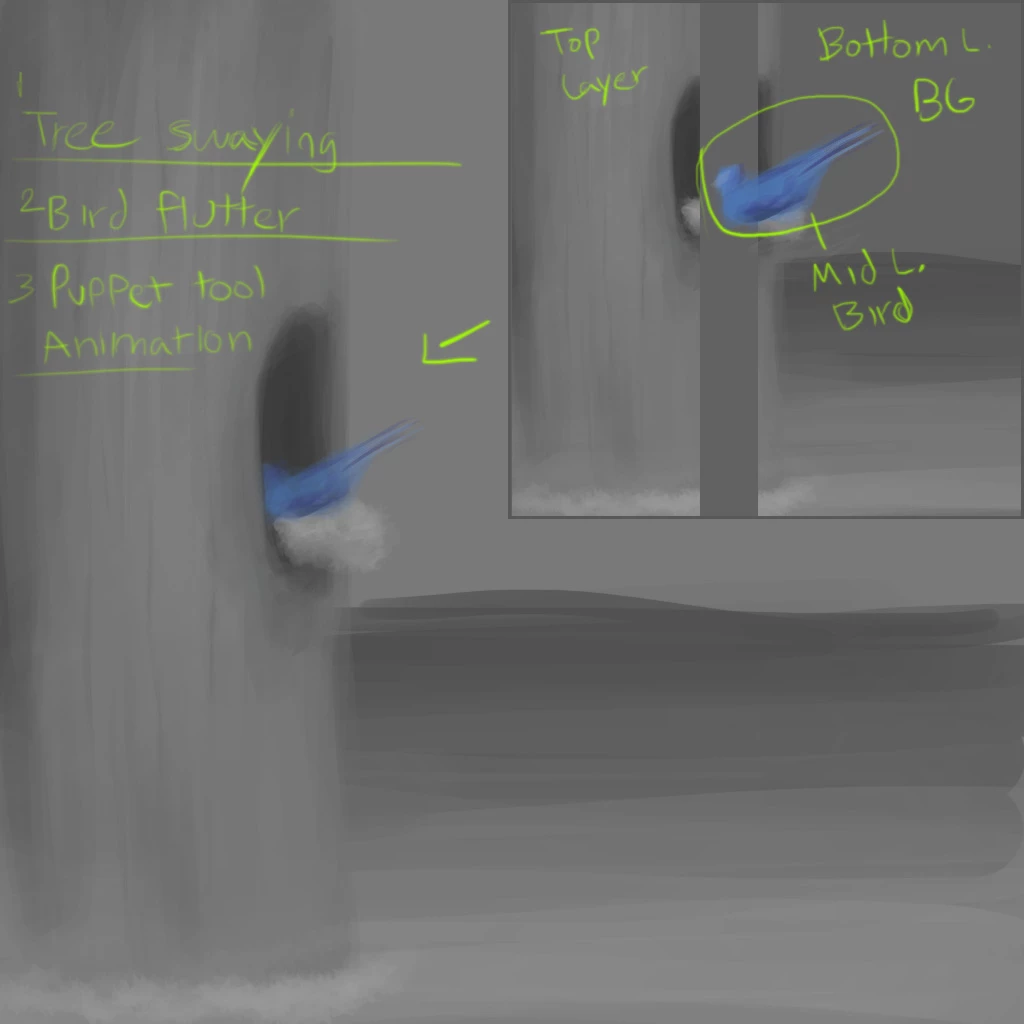
Basically I got 3 layers involving a tree and a bluejay. I want the bluejay to go inside its tree home (its just a nest half way inside the tree). With puppet tools I can get the bluejay to flutter around and hop in. The way its layered, it looks like the bird goes in correctly with a bit of the true hiding the bluejay in front.
I have the tree split into 2 layers, one BEHIND the bluejay, and 1 INFRONT.
So it would be from front to back
- Tree front (hides the nest and bluejay slightly to give appearance of depth)
- Blue Jay (in front of BG but behind tree front)
- Tree Back (background)
Thats how its layered. Now this wasnt a problem but my daughter suggests I should make the tree sway to give it more "aliveness" so I cant say no. Im desperate. Ive been looking up puppet tools but they all describe single character process. I cant find one that shows how to deal with moving intersections.
Ive only ever used AE for compositing and simple work. Ive never had to do this kind of motion work.
To sum it up, I need to make both layers of the tree sway while the bird still looks like it goes into the center of the tree without the tree looking like it has a huge tear in-between. I believe the answer is somewhere in pre-comps but I cannot wrap my head around this. Any help or point in the right direction would be GREATLY appreciated.
 AdChoices