
Participant
June 10, 2019
Answered

Can I use time displacement to REVERSE time

  • June 10, 2019
  • 1 reply
  • 684 views

I'm trying to have part of an comp play forwards in time and part play backwards in time - with a gradient ramp between the two times.

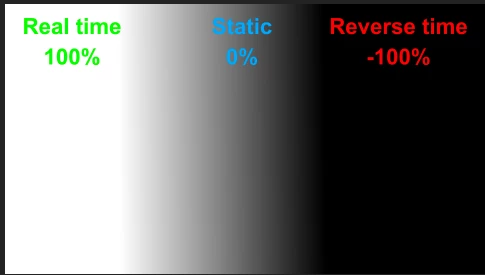
Time displacement with a luminance map only seems to play footage forwards from different points. Is there a way to link luminence to speed? i.e. White = 100%, grey = 0%, black = -100%.

Thanks
This topic has been closed for replies.
Correct answer Rick Gerard

ahem, typo


If you want the footage to play backward you need start with gray - real time, then animate to black - back in time. You cannot do it without a change in the color the time will always move forward. You cannot do it with a static gradient. The displacement map, the gradient, controls which pixels are moved backward and forward in time. There is no direct correlation between luminance and speed, luminance controls time.

That was explained in the last paragraph of my reply.

If you are trying to change the speed of the entire clip use time remapping. If you want the left side of the clip to play forward and the right side to play backward then animate the colors in the gradient from gray to white and gray to black.

1 reply

Community Expert
June 10, 2019

If it is a simple time change the easiest tool to use is Time Remapping. It does take a while for most folks to wrap their head around the Graph Editor and Time Remapping, but for whole image time changes, you can do more with less fuss.

If you are trying to make time changes in different parts of the frame then maybe you need another tool.

Time displacement works on luminance. 50% gray = no time change. Maybe these screenshots will explain things. the comp has 3 text layers all counting time in tenths of a second, one in the main comp and two in the nested comp. It also has a rotating cross that turns 45º every second. Here's what it looks like with Displace Time turned off. Here's what the comp looks like with Time Displacement turned off:

The time is 2 seconds and the cross looks like a cross. Turn time displacement on and you get this:

The current time (red) is still 2 seconds but the time over the white has moved forward 2 seconds and the time under the black is zero, and the cross is distorted forward and backward in time. But wait, why did the time under the white move forward but the time under the black move back only 2 seconds? Because the clock starts at zero. Move the CTI to 4 seconds and the math is correct:

The time over the white will never get higher than 6 because that is how long the movie is and the time over the black will never go lower than zero because that is when the movie starts.

I hope this makes sense. Design the gradient properly and animate the color or the start and end points properly and you can have a movie (or animation in a nested comp) play forward or backward in time depending on the luminance value of the gradient. By far the easiest tool to use to create and animate the gradient is a shape layer.

If the luminance value changes the time changes so if your gradient stays black then the time under the black will remain behind the real-time but play forward.

If you animate the gradient from gray (no change) to black then time will appear to go back until you reach black, then it will start moving forward again.

_GartAuthor
Participant
June 10, 2019

Thank you for all the screenshots. But what I'm trying to achieve is a luminance for speed change rather than time displacement.

i.e. black would be playing the footage backwards and white would be playing it forwards. I understand how the speed displacment effect works and maybe it's not possible with that. Is there another tool could be misused to achieve this?

This is what I want to do:

_GartAuthor
Participant
June 10, 2019

ahem, typo