Rob Ainscough
Inspiring
April 11, 2022
Question

Can no long display seconds "s" in timeline for my composition?

  • April 11, 2022
  • 2 replies
  • 350 views

I used to be able to get seconds (s) to display like this in prior Ae versions:
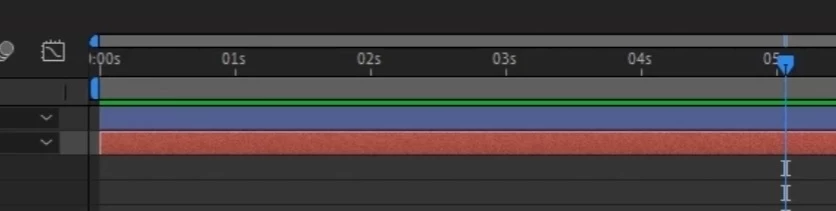
Now in 2022 my only options are this:
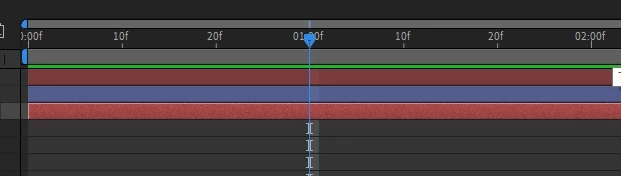
or this:
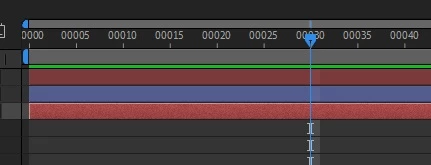
What happened to seeing "seconds" (s) ... did this feature get removed?

I'm running verison Ae 22.2.1 (build 3) ... is this a bug or by design?  If by design, please give me some alternative so I can get my seconds back.  99.9% of the time I work with seconds.


Rob

This topic has been closed for replies.

2 replies

Community Expert
April 11, 2022

When you have a short timeline frame numbers start showing up between the Seconds display. That is what is happening in the second screenshot. If you zoom way in on the Timeline, or the comp is really short, you will see individual frames. 


The bottom screenshot looks like you have the comp set to frames. You can change this by Ctrl/Cmnd clicking on the time/frames display in the Timeline panel.


Nothing is wrong. Nothing changed.

nishu_kush
Legend
April 11, 2022

Hi Rob,


Go to File > Project Settings > TIme Display Style tab and change it to Timecode. 

Let us know if it helps.


Thanks,

Nishu

Rob Ainscough
Inspiring
April 11, 2022

Hi Nishu,


Tried that, doesn't make a difference ... Timecode or Frames, I get the same results.


Tried a new comp also with different settings still same issue. 


Tried Preferences | Display ... unchecked and checked "show both timecode and frames in timeline panel" still can't get "s" seconds back.


Ctrl + click on the time display panel to toggle still doesn't show seconds only.


Tried zooming way out, still no "s".


No matter what I do, I can no longer get "s" (seconds) back in my timeline.


Cheers, Rob.