
robertsdigitald81389881
Known Participant
January 24, 2021
Answered

Can someone show me a brief "video" tutorial on how to create this?

  • January 24, 2021
  • 2 replies
  • 445 views

Can someone show me a brief "video" tutorial on how to create this

https://imgur.com/enMYww9

A video expanation will be much easer to follow

thanks


This topic has been closed for replies.
Correct answer Rick Gerard

I am not going to do your homework for you but I'll give you the steps and I'll strongly suggest you spend some time with the User Guide so you understand the basics.
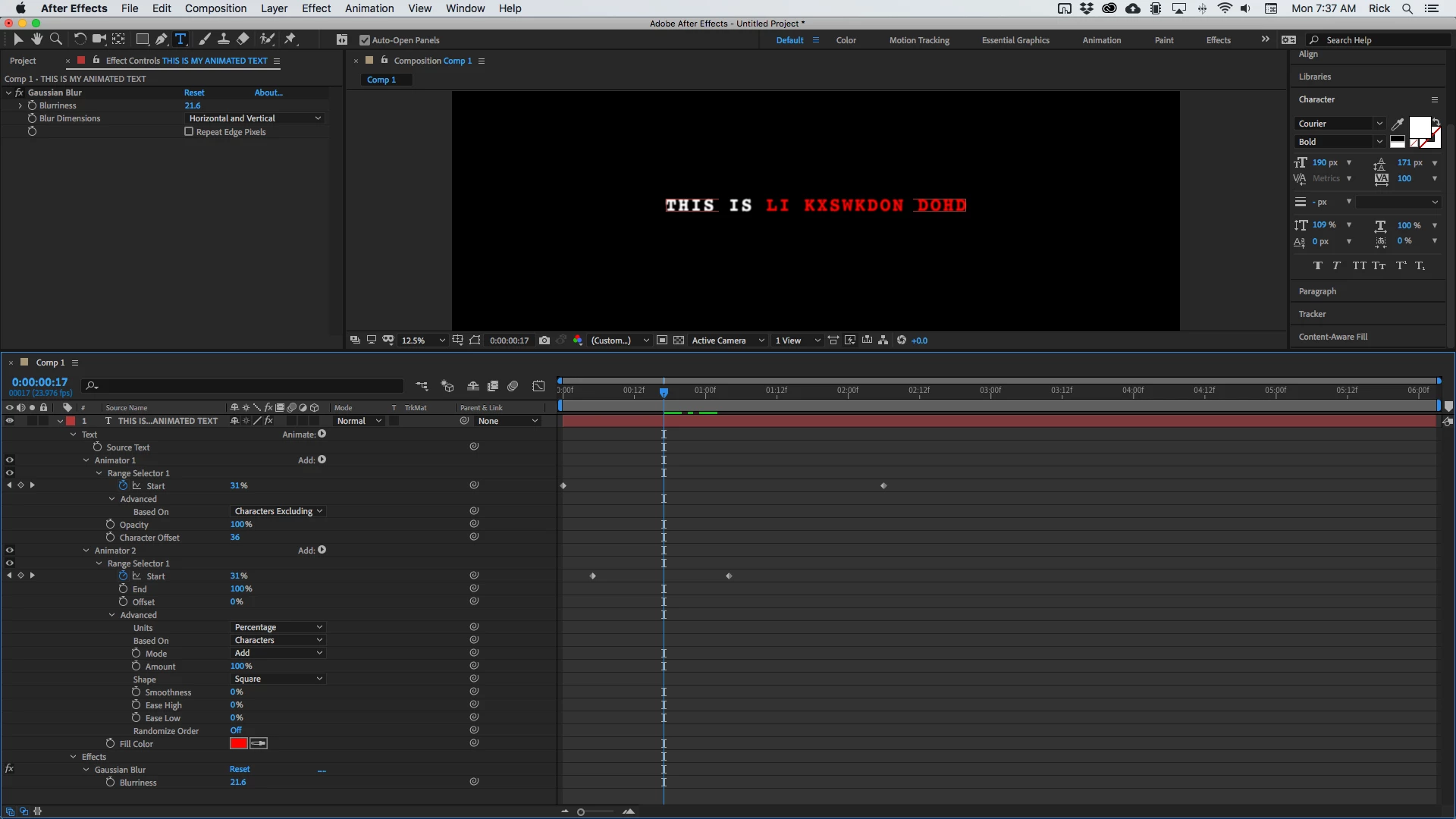
  • Create your text layer. 
  • Go to the Effects and Presets panel and type in 'decode'
  • Decoder Fade in should show up in the list
  • Add this to your text layer by double-clicking and the text will now animate through random letters and resolve to the original text
  • Press the "u" key twice to reveal all of the modified properties of your text layer and you will see two keyframes that you can move around to adjust the timing and a bunch of other items that have been added
  • Study what you see and figure out what all the controls do
  • You will see an Opacity animator that you can delete if you do not want the letters to fade in
  • Click on the Animate option at the top and select Color/RGB to add a color animator
  • Spin down Animator 2 and look at the options you are given
  • Drag some of the values around and set a couple of keyframes until you get what you want
  • Add additional animators to complete your animation

Take a look at this screenshot. A project like this can be done on one layer. The sample you posted looks like a terrible workflow. Spend some time with the User Guide. There are tutorials on using text animators. 

2 replies

Rick GerardCommunity ExpertCorrect answer
Community Expert
January 25, 2021

I am not going to do your homework for you but I'll give you the steps and I'll strongly suggest you spend some time with the User Guide so you understand the basics.

  • Create your text layer. 
  • Go to the Effects and Presets panel and type in 'decode'
  • Decoder Fade in should show up in the list
  • Add this to your text layer by double-clicking and the text will now animate through random letters and resolve to the original text
  • Press the "u" key twice to reveal all of the modified properties of your text layer and you will see two keyframes that you can move around to adjust the timing and a bunch of other items that have been added
  • Study what you see and figure out what all the controls do
  • You will see an Opacity animator that you can delete if you do not want the letters to fade in
  • Click on the Animate option at the top and select Color/RGB to add a color animator
  • Spin down Animator 2 and look at the options you are given
  • Drag some of the values around and set a couple of keyframes until you get what you want
  • Add additional animators to complete your animation

Take a look at this screenshot. A project like this can be done on one layer. The sample you posted looks like a terrible workflow. Spend some time with the User Guide. There are tutorials on using text animators. 

robertsdigitald81389881
Known Participant
January 25, 2021

Thank you Rick

That was very helpful


Mylenium
Legend
January 24, 2021

I'm not clear what you are asking specifically. Seem like you have things pretty much figured out already. What exactly is it that you are struggling with?


Mylenium

robertsdigitald81389881
Known Participant
January 24, 2021

Mylenium


The text animation in the video is not mine

I'm not well acquainted with after effects so I'm not an expert but I want to create that exact same animation.

That video only shows the playback

What I want, is a video tutorial on how that was created so that I can learn

Need it for a school project

Any help would be greatly apreciated

Thx again


OussK
Community Expert
Community Expert
January 25, 2021

Check this simple project where you can get the idea, how to create the decoder effects and change the color using fill effects, https://we.tl/t-4xcWkms4mK it's not the same one ou ask for but it can give you the idea