Participant
September 27, 2017
Answered

Can't copy and paste items from Illustrator to After

  • September 27, 2017
  • 2 replies
  • 7016 views

This can be a really dumb question but i just don't know how to solve it. I just can't copy and paste items from my Illustrator to After, even if i drag the item, nothing happens... Also if i import the object from Illustrator, After Effects crops the objects.

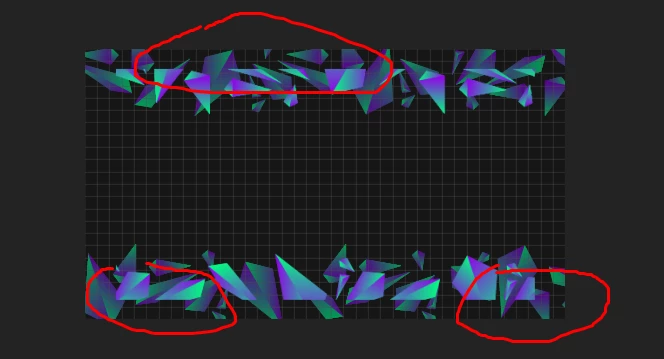
This is what After does, it crops the shapes
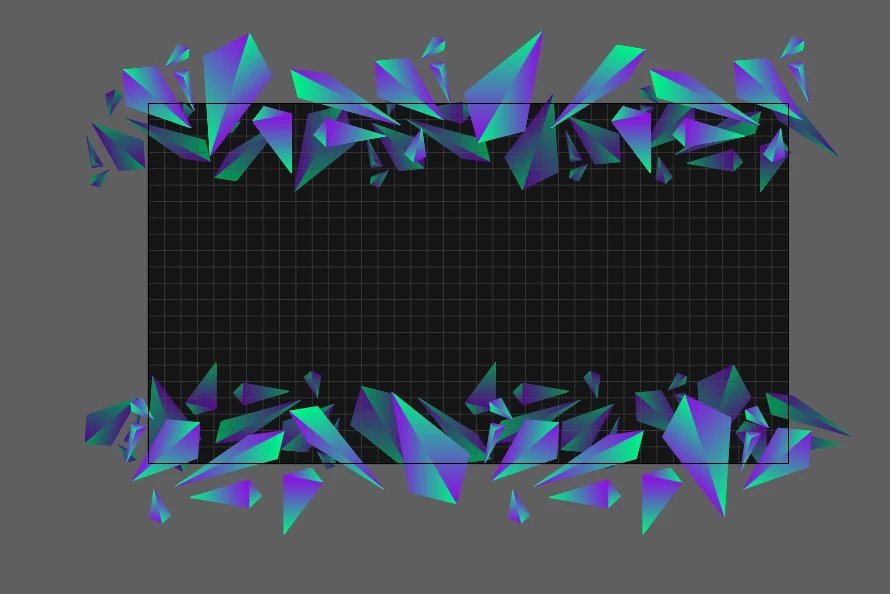
And this is the original file
This topic has been closed for replies.
Correct answer angie_taylor

If items exist outside the artboard in Illustrator (as yours do here) then they will be cropped in AE. If you want them to be positioned inside the comp, place the entire shape within the bounds of the artboard.

2 replies

angie_taylor
Legend
September 27, 2017

Also, To copy and paste paths from Illustrator to Ae you need to make sure that you go into your Illustrator preferences, and under File Handling and Clipboard, select AICB > Preserve Paths. Now you should be able to copy and paste :-)

NixHellmann
Participant
August 6, 2021

Oh my word thank you so much - I was going crazy.

angie_taylor
angie_taylorCorrect answer
Legend
September 27, 2017

If items exist outside the artboard in Illustrator (as yours do here) then they will be cropped in AE. If you want them to be positioned inside the comp, place the entire shape within the bounds of the artboard.

Warren Heaton
Community Expert
Community Expert
September 28, 2017

In keeping with what Angie suggested, you can also increase the Artboard Size in Illustrator such that none of your objects go into the AI Scratch Area (that is, all object are within the Artboard).  Edit > Edit Original is probably the easiest way to make the round trip.  After you save the change to your AI file and return to AE, your footage will reload automatically at its new spatial resolution.

If you imported the AI as a Comp, you'll have to make the same change to the Comp size in AE as you made to the Artboard Size in AI.

lf you've already started to align your layers in AE or started to animate, sometimes changing the Artboard Size can leave you with some adjusting to do as well.

angie_taylor
Legend
September 28, 2017

good suggestion if you want to do this, select your artwork in Illustrator and then go to Edit > Artboards > Fit To Artwork Bounds (from memory - not in front of illustrator!)