BartonGarrett256
Inspiring
Mar 28, 2017 11:57 PM UTC
Answered

Can't Extrude Illustrator Text in C4D

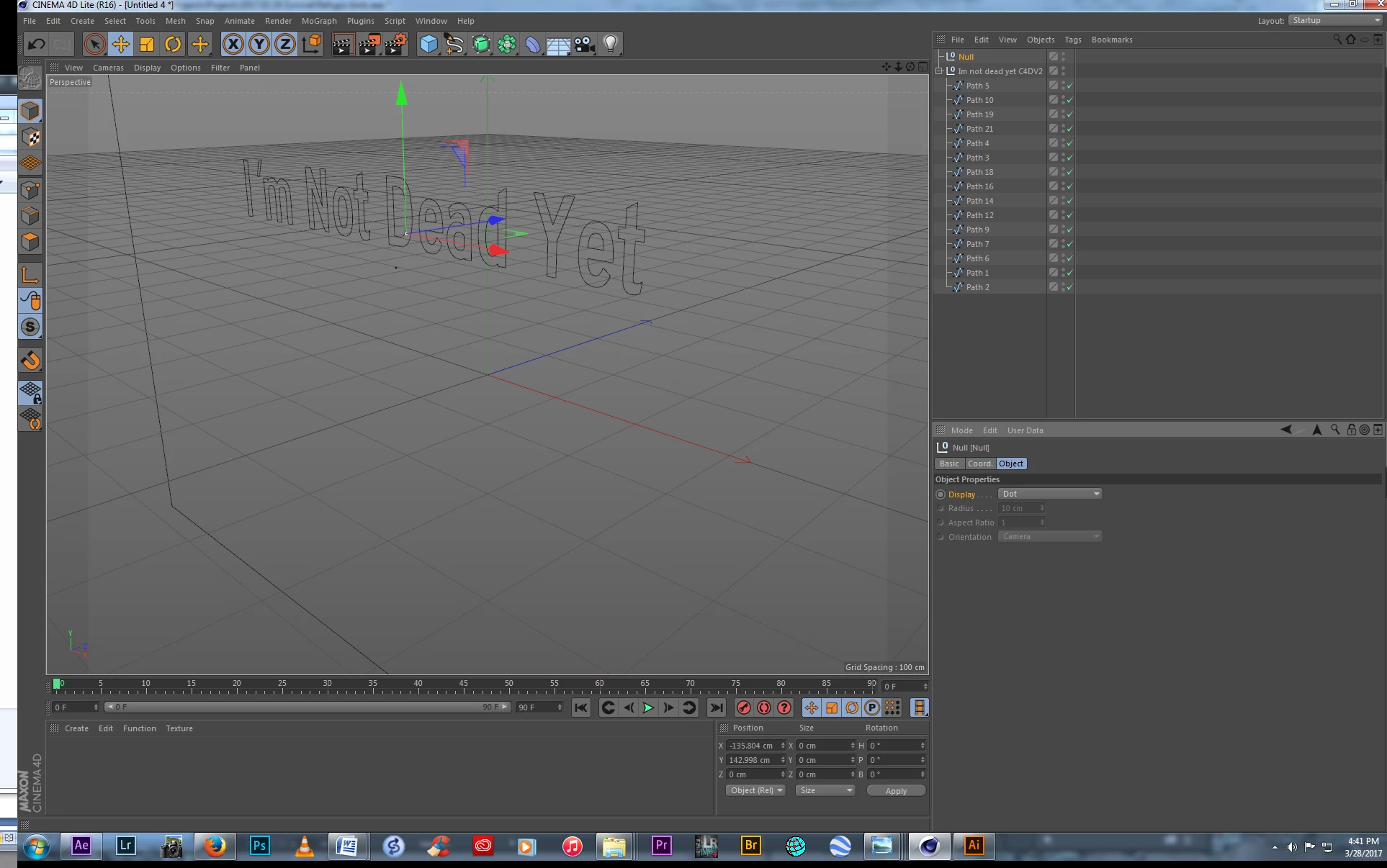
I've gotten all the way through the multiple secret handshakes to get text into C4D, including the version 8 format, but am stuck and my text will not extrude.  I search the forums and get instructions that say the catch is- I have to, under Object, check the box Hierarchical to link the splines, without doing that it can't extrude a null, which is how it came in.     I can't get that box to appear, so I can't check it.  Any suggestions would be welcome.

This topic is closed to new replies. Start a new post to keep the conversation going.
BartonGarrett256
BartonGarrett256Correct answer
Inspiring
Mar 31, 2017 9:10 PM UTC

Thanks so much, that incredibly precise answer and an hour of my time solved the problem.  I do hope I did not pull you away from your work at the State Department too long.  Say Hi to Rex for me.

If someone else gets stuck, and happens upon this- The Maxon tutorials I was directed to when I installed the program did not help. They are, to my inexperienced eyes, designed for someone creating shapes from scratch.  I simply wanted to extrude some text.   Nor did the Lynda.com tutorials help (they are usually pretty good) and I could not get anywhere with Maxon's on-line help.  I found the solution in a comment posted to a lame YouTube tutorial done by a kid in his basement, you know, the kind that start out "Yo Dudes". Go figure.

Maxon changed the name of Extrude Nurbs to Extrude. All the tutorials I found told me to use Extrude Nurbs to get the null to extrude. I spent a lot of time trying to figure out how to get to the Extrude Nurbs command.  I could not find it, mostly because it is not there.  After you do all the other steps in Illustrator- saving in 8, centering and creating outlines it will still come in as a null and you have to apply that to get it to extrude. 

Two steps to solve the problem- first drag Extrude from the top pull down menu- it is in the sub-menu of  the green cube with a scaffold around it icon- onto your file in the menu at the right of your screen, then do not forget to, under the Object tab menu down below it- check the Hierarchical box.   And then Bob's your uncle.

3 replies

Mylenium
Legend
Mar 29, 2017 6:26 AM UTC

Umm, well, it would help to actually put them under an extrude object, not a Null object. Seriously, read the C4D help instead of relying on questionable tutorials.

Mylenium

Translate
BartonGarrett256
BartonGarrett256AuthorCorrect answer
Inspiring
Mar 31, 2017 9:10 PM UTC

Thanks so much, that incredibly precise answer and an hour of my time solved the problem.  I do hope I did not pull you away from your work at the State Department too long.  Say Hi to Rex for me.

If someone else gets stuck, and happens upon this- The Maxon tutorials I was directed to when I installed the program did not help. They are, to my inexperienced eyes, designed for someone creating shapes from scratch.  I simply wanted to extrude some text.   Nor did the Lynda.com tutorials help (they are usually pretty good) and I could not get anywhere with Maxon's on-line help.  I found the solution in a comment posted to a lame YouTube tutorial done by a kid in his basement, you know, the kind that start out "Yo Dudes". Go figure.

Maxon changed the name of Extrude Nurbs to Extrude. All the tutorials I found told me to use Extrude Nurbs to get the null to extrude. I spent a lot of time trying to figure out how to get to the Extrude Nurbs command.  I could not find it, mostly because it is not there.  After you do all the other steps in Illustrator- saving in 8, centering and creating outlines it will still come in as a null and you have to apply that to get it to extrude. 

Two steps to solve the problem- first drag Extrude from the top pull down menu- it is in the sub-menu of  the green cube with a scaffold around it icon- onto your file in the menu at the right of your screen, then do not forget to, under the Object tab menu down below it- check the Hierarchical box.   And then Bob's your uncle.

Translate
Participant
Dec 9, 2023 9:37 PM UTC

Oh boy I wish I'd seen your post an hour ago ! There's now infra red sniper sight spots coming through the office window - I think I know too much...

Translate