

dparsons85
Legend
August 29, 2017
Answered

Can't move anything to different folders

  • August 29, 2017
  • 3 replies
  • 3940 views

When I try to move an item into a different bin I get a popup essentially telling me I can't do that (see image below - red circle with slash). This appears to happen after I select a bunch of elements in a timeline and PreComp them but I can't be sure. This absolutely destroys any ability to work. I can't get around it and even worse it seems to infect old saves as well. Any and all help is appreciated!
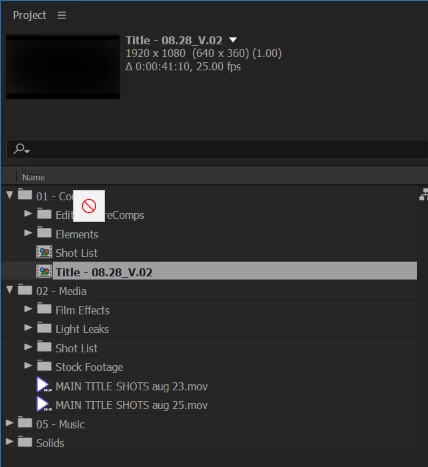
    Correct answer dparsons85

    The problem seems to be with my dual monitor setup. If I have the project panel on my second monitor there's a large portion of the bins I can't drag to, BUT if I drag the file to the right most part of the bin window it works.

    3 replies

    dparsons85
    dparsons85AuthorCorrect answer
    Legend
    January 31, 2018

    The problem seems to be with my dual monitor setup. If I have the project panel on my second monitor there's a large portion of the bins I can't drag to, BUT if I drag the file to the right most part of the bin window it works.

    Lively_elegance1587
    Participant
    September 4, 2020

    I have the same problem - including moving layer orders in the comp window too - it was fine but it seems like a bug in AE 2020 - if i drag to my default monitor it works again for dragging in project panel and reordering layers - it is because the project I am working on is a bit heavy with illustrator files - but its definitely a bug in AE 2020 I've never encountered on previous versions

    Participant
    January 7, 2021

    Seems to bee a dual monitor issue indeed. I fixed it by swapping the 'home' monitor in the finder preferences (Mac).


    1. In the finder go to System Preferences > Displays

    2. Drag the white bar at the top indicating the home screen accross to the other screen.

    Jose Panadero
    Community Expert
    Community Expert
    August 29, 2017

    Are you using the Selection Tool? Sometimes, if you have the Hand Tool selected you cannot do regular tasks

    dparsons85
    Legend
    August 29, 2017

    No that's not it. Also, I seem to have spoken too soon. The problem is back and I didn't PreComp anything. I solved it again temporarily by clearing my caches and restarting but I didn't find the underlying issue.

    Kevin-Monahan
    Community Manager
    Community Manager
    September 5, 2017

    Hi DParsons,

    Is this issue still affecting you? Please let us know.

    Thanks,
    Kevin

    Kevin Monahan - Sr. Community and Engagement Strategist – Adobe Pro Video and Audio
    dparsons85
    Legend
    August 29, 2017

    Just solved it... hopefully.

    I went to Edit > Preferences > Media & Disk Cache > and chose Empty Disk Cache and Clean Database & Cache

    I then restarted my comp. Hopefully that works if you have the same issue.