


Participant
September 19, 2023
Question

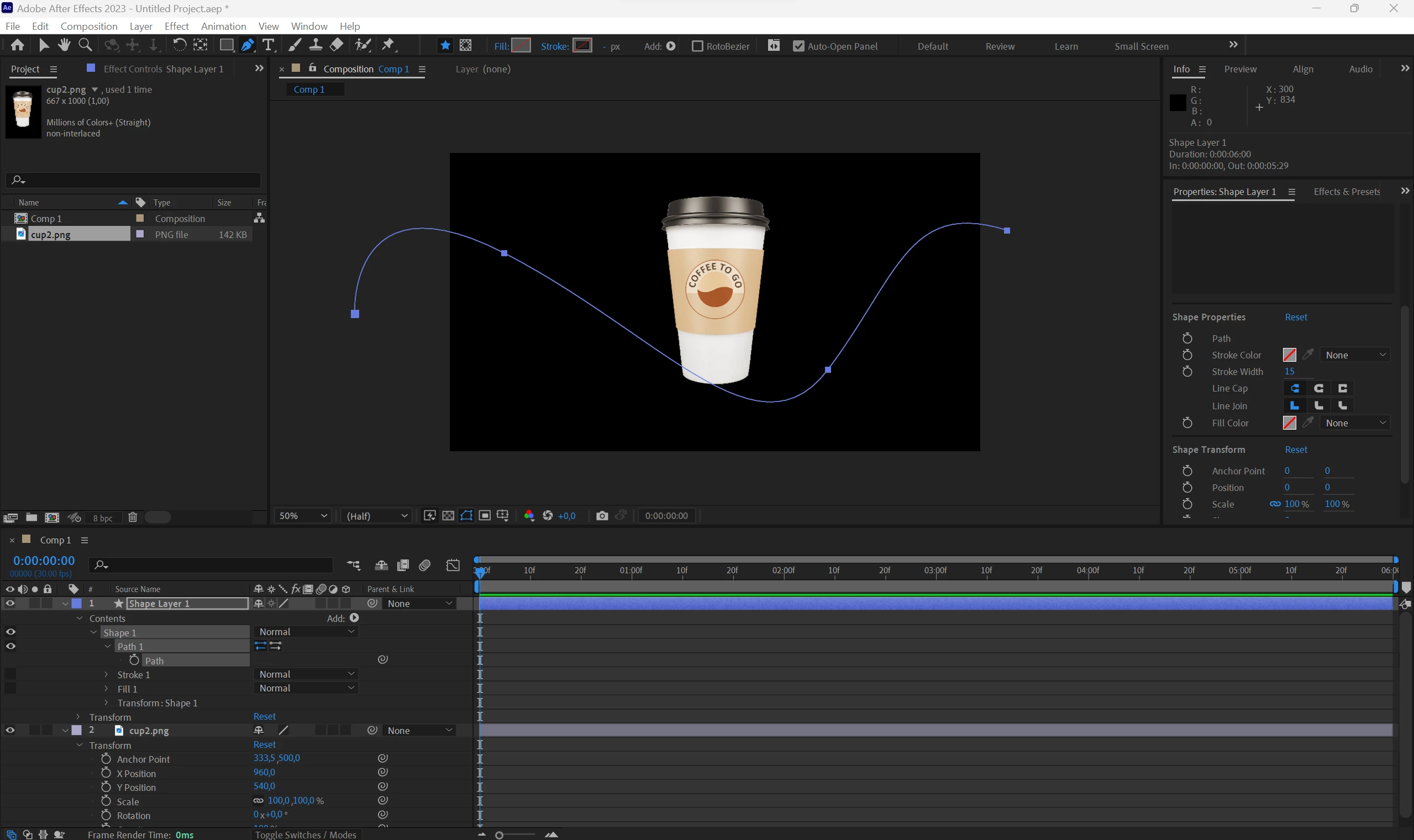
Can't paste a path into position of an object

  • September 19, 2023
  • 1 reply
  • 1320 views

Hi all, 

I'm trying to copy shape layer path into position of an image to make it move along the path but it's not working for me. I'm following this tutorial - (9) After Effects Tutorial: Animate Any Object or Text Along a Custom Path - YouTube


Could you please help me resolve the issue?
 

This topic has been closed for replies.

1 reply

Community Expert
September 20, 2023

Make sure that the Transform properties for the shape layer are reset. Select the Path on the shape layer and set a keyframe. Select the Keyframe and Cut or Copy (Ctrl/Cmnd + x or Ctrl/Cmnd + c).


Move the Time indicator to where you want the animation to start. Select your cup layer  (Layer 2) and press Alt/Option + P to set a position keyframe, then Paste (Ctrl/Cmnd + v). 


That should fix the problem. 


I give that tutorial a C. The workflow is only fair.

Participant
September 20, 2023

Thank you for the reply!

I've done everything that you described but, unfortunately, still nothing happens when I paste the path into position keyframe.