
donovandragon
Participating Frequently
May 9, 2019
Answered

Can't Replace Footage With Single JPG

  • May 9, 2019
  • 2 replies
  • 1402 views

I am making a slideshow. For various reasons I made a comp with photos 01.jpg through 20.jpg, and put some filters on them.

Then I duplicated that comp, and tried to replace 01.jpg with a file of the same name from a different folder. So trying to replace old 01.jpg with new 01.jpg.

Unfortunately this triggers the sequence import and it won't replace the single file with a single file. It replaces it with a footage sequence.

Does anybody know how to keep that from happening? I have 250 photos so I was hoping this might be something of a shortcut. I want to keep all my filters and settings in the template comp without having to remake it again.

Thanks!
    This topic has been closed for replies.
    Correct answer Andrew Yoole

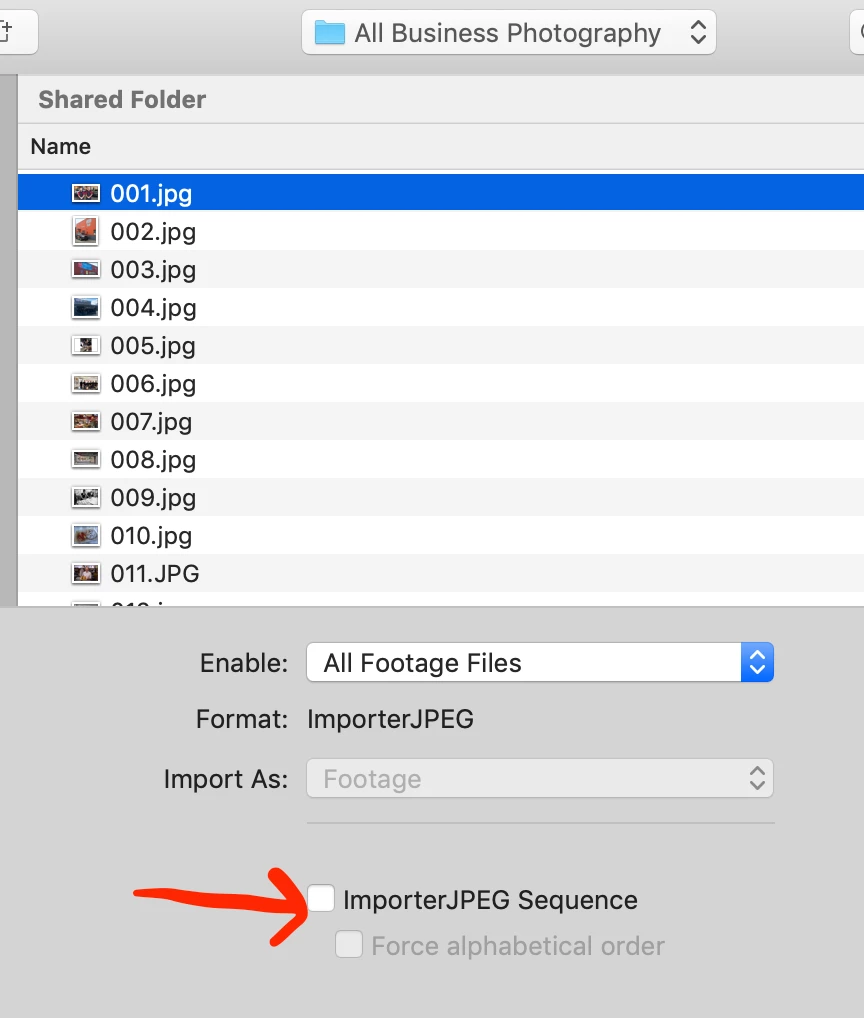
    When you replace the footage in the project window, you need to ensure that the [file format]Sequence checkbox is NOT ticked.  After Effects sometimes automatically assumes a sequence of numbered files is a file sequence, and you need to uncheck that box.

    2 replies

    Community Expert
    May 9, 2019

    You should be able to replace layer in the timeline with any source in the Project Panel by selecting the source in the timeline, then select the replacement in the project panel, hold down the Alt/Option key and drag the replacement to the timeline.

    If that does not work let us know. Most folks don't get the sequence right the first time.

    donovandragon
    Participating Frequently
    May 9, 2019

    I am not talking about the old replace footage issue of select it in my timeline, then replace it with something in the project window.

    I am talking about footage that is in my project window that I am trying to replace with alternate footage from my hard drive. If I choose "replace footage" in the project window, it isn't replacing my existing with 01.jpg with another file of the same name. It is replacing it with a sequence of all assets in the folder, because they are sequentially named.  I just want to replace it with one image.

    Andrew Yoole
    Andrew YooleCorrect answer
    Inspiring
    May 10, 2019

    When you replace the footage in the project window, you need to ensure that the [file format]Sequence checkbox is NOT ticked.  After Effects sometimes automatically assumes a sequence of numbered files is a file sequence, and you need to uncheck that box.

    Abambo
    Community Expert
    Community Expert
    May 9, 2019

    What Adobe software are you using?

    ABAMBO | Hard- and Software Engineer | Photographer
    donovandragon
    Participating Frequently
    May 9, 2019

    Sorry I am using After Effects CC 2017, because 2018 broke a bunch of things I need.

    Abambo
    Community Expert
    Community Expert
    May 9, 2019

    Discussion successfully moved from Forum comments to After Effects

    I was just asking to be able to move your question to the correct forum. Forum comments is for comments and trouble shooting for the fora...

    ABAMBO | Hard- and Software Engineer | Photographer