
Participating Frequently
October 17, 2024
Answered

Can these four problems be solved using the Automation Blocks AE Extension?

  • October 17, 2024
  • 4 replies
  • 1247 views
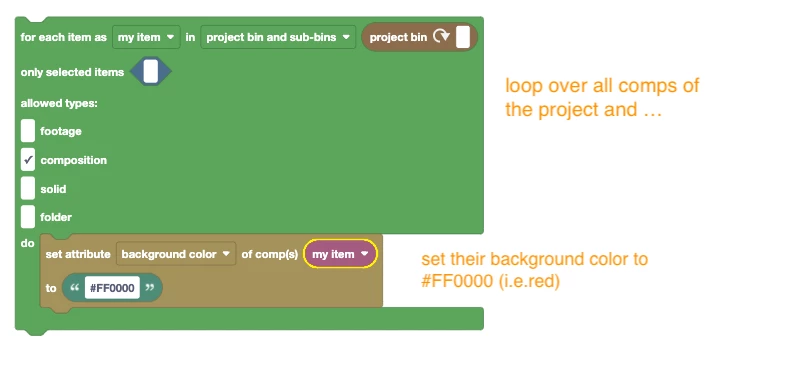
  1. How can I change the color settings of multiple compositions?
  2. How can I set a specific work area (e.g., 0-5 seconds) in the timeline for all compositions?
  3. How can I choose a specific resolution/down-sample factor (e.g., quarter, half, full) in the selected composition?
  4. How can I turn off motion blur in the selected composition?
This topic has been closed for replies.
Correct answer Mathias Moehl

How can I change the color settings of multiple compositions?

The background color can be changed exactly in the same way as the workarea:

4 replies

Mathias Moehl
Community Expert
Mathias MoehlCommunity ExpertCorrect answer
Community Expert
October 17, 2024

How can I change the color settings of multiple compositions?

The background color can be changed exactly in the same way as the workarea:

Mathias Möhl - Developer of tools like BeatEdit and Automation Blocks for Premiere Pro and After Effects
Mathias Moehl
Community Expert
Community Expert
October 17, 2024

How can I turn off motion blur in the selected composition?

See my answer to question 3

Mathias Möhl - Developer of tools like BeatEdit and Automation Blocks for Premiere Pro and After Effects
Mathias Moehl
Community Expert
Community Expert
October 17, 2024

How can I set a specific work area (e.g., 0-5 seconds) in the timeline for all compositions?

Use the For Each Project Item block to loop over all compositions and then again the Set Attribute of Comp block to set the workarea:


Mathias Möhl - Developer of tools like BeatEdit and Automation Blocks for Premiere Pro and After Effects
Mathias Moehl
Community Expert
Community Expert
October 17, 2024

How can I choose a specific resolution/down-sample factor (e.g., quarter, half, full) in the selected composition?

Using the Set Attribute of Comp block.


Here is an example which you find in the Automation Blocks library at
Examples/Comps/Comp Settings/Performance/Set Performance Low Quality (fast)

It disables motion blur and frame blending and sets resolution to quarter

Mathias Möhl - Developer of tools like BeatEdit and Automation Blocks for Premiere Pro and After Effects
MalayPalAuthor
Participating Frequently
October 21, 2024

It works when I click on a single composition, but not with multiple or selected compositions. Please check the video and resolve the issue.

Mathias Moehl
Community Expert
Community Expert
October 21, 2024

If you want to set it for all compositions, you need to loop over them exactly in the same way as in my other examples below (like setting the work area).

Mathias Möhl - Developer of tools like BeatEdit and Automation Blocks for Premiere Pro and After Effects