
kirillka
Participant
April 7, 2021
Answered

Cannot change the size of the brush!

  • April 7, 2021
  • 4 replies
  • 13864 views

Hello!

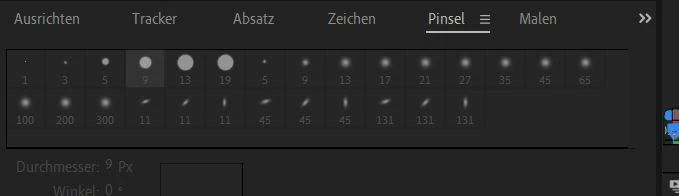
I work with the latest version of AE (18.0.1.) and now am trying to paint some  simple dots on a solid (after double clicking on it), but the size of the brush won't change when I open the brush window. On the screenshot you can see the window, it seems to be dead, doesn't react on clicking on it. Does anybody know the problem and has a solution? Probably it is something completely obvious, but I jaust cannot see it 🙂

Thanks and cheers!
Correct answer kirillka

Solved! I just made some random changing of the workspace from "Standard" to "Original" and then back and then the brushesWOKE UP! I don't really know the magic behind it, but it did help!

Thanks for responding, it was great to see, that I'm not left alone with this great, but sometimes opaque software!

Cheers!

4 replies

Gerhard_Draws
Known Participant
August 22, 2025

I also have this problem. Changing the workspace doesn't fix it and yes ofcourse the brush is selected. 

Wow. Same bug since 2021. 

nishu_kush
Legend
August 25, 2025

You may try running After Effects in Safe Mode. If that fixes the issue, resetting the preferences is what you need. 

Let me know how it goes.


Thanks,
Nishu

Participant
November 5, 2024

Just adding up that it's ridiculous that in late 2024 this bug is still here. I can't work with the brush in custom workspaces.

Participant
December 12, 2024

I just ran into this issue with the clone tool. I closed the brushes panel and opened it again and I was able to change the brush size. This should be such a simple fix since it's clearly UI based. Adobe needs to address this, but in the meantime try just closing and opening the brush panel. (Ctrl+9)

Known Participant
December 15, 2023

Same problem here. Brush is stuck on default size 13 100%soft

Need to get hard etc

Known Participant
December 15, 2023

Yes, can only work in Standard Workspace. Brush sizes and hardness disabled in Custom Workspace.
thanks for solve!

P.M.B
Legend
April 7, 2021

The problem is probably that you don't have the brush tool selected.

In order to use the paint tool you need to 1) create a layer 2) open the layer in the layer panel 3) have the brush tool selected (not necessarily in that order)

And the tool needs to be selected in order for the paint tool panel to "wake up"


You should always upload shots of your entire interface because issues may be and often are dependent on other factors.


~Gutterfish
kirillka
kirillkaAuthor
Participant
April 7, 2021

Thanks for a quick response!

The brush was activated, the layer (a solid) was made and the layer panel was open, too. I've already made some dots with the 9 px brush, but couldn't change the size. And now I'm beginning to go slightly nuts, because I don't see, what is wrong 🙂 Also since I've been working with the software for a while now and also already have been panting with different brush sizes. You're right, the screenshot should've been of the entire interface. I've uploaded another one. Many thanks!


kirillka
kirillkaAuthorCorrect answer
Participant
April 7, 2021

Solved! I just made some random changing of the workspace from "Standard" to "Original" and then back and then the brushesWOKE UP! I don't really know the magic behind it, but it did help!

Thanks for responding, it was great to see, that I'm not left alone with this great, but sometimes opaque software!

Cheers!