

AntDX316
Inspiring
January 3, 2022
Question

Cannot click last frame/time help :(

  • January 3, 2022
  • 1 reply
  • 672 views

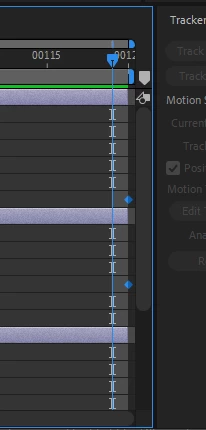
I can't move the playhead to the last one.  I can "cheat" it but having a keyframe there.. basically I've trimmed down the composition to be prefectly at 120 frames but I can only go to 119.  How do I make the playhead go all the way to the very very end??  Dragging it doesn't work. 😞


This topic has been closed for replies.

1 reply

Inspiring
January 3, 2022

Obvious question... in Composition > Composition Settings is the start frame set as zero? 0-119 is 120 frames.

If so, just change it to start from 1 and you'll be able to go to frame 120. Nothing will actually change, you'll still see the exact same 120 frames, it'll just be numbering the comp starting from 1.

AntDX316
AntDX316Author
Inspiring
January 4, 2022

It's 120 as the end.  Adobe should fix.  Try it yourself.

Inspiring
January 4, 2022

Not sure what you mean. If it's a 120 frame comp and the last frame is 119 then your first frame must be 0.

0-119 is 120 frames. If you want to go from 0-120 you need a 121 frame comp, or if you want to go from 1-120 then you need to set the comp numbering to start from 1.

If you're referring to the time notch showing 120 just visible at the top left then that's simply that the notches denote every 5 frames when at that zoom on the timeline. Keyframes can exist outside the comp range so having one on your 121st frame (i.e. frame 120 when numbering from zero) is something you're free to do, but that frame won't render because it's outside your active range of 0-119 (again, 120 frames).